Showing posts with label #Kafka. Show all posts

Tuesday, June 23, 2020

An Introduction To Amazon Managed Streaming For Apache Kafka


The popular video stream-processing software, Apache Kafka has gained significant traction over the recent years. The open-source tool that is mainly used for processing live streaming data, Kafka provides real-time analytics to derive maximum value from the streaming media content. Kafka has grown tremendously as many organizations have adopted this platform for building real-time data pipelines and video streaming applications. That being said, over one third of the fortune 500 companies use Kafka to run and manage their video streaming operations.

Seeing its increasing popularity, Amazon rendered its cloud support for Kafka to build and deploy applications that facilitate video stream processing. With the advent of Amazon MSK (Amazon Managed Streaming for Kafka), it has become easy to build and run real-time data pipelines and streaming applications. Amazon MSK also lets you populate various data lakes and stream variations from databases. Furthermore, you can use it to power machine learning algorithms and build applications with real-time analytics features.  


Challenges With Apache Kafka

Despite the many benefits, Apache Kafka clusters are not easy to set up, scale, and manage in the production environment. Developers must manually configure Kafka before they can run it. Additionally, it requires provision servers, in case your existing servers incur any unanticipated failure. 

Developers must orchestrate server patches, system upgrades, optimize clusters, and consistently manage scaling events to support load changes. Above all, developers need to ensure that data is securely stored for easy accessibility.  

How Amazon MSK Overcomes These Challenges

Amazon Managed Streaming for Kafka (MSK) enables developers to build and run streaming applications on Apache Kafka with ease. With Amazon MSK, they do not require expertise from Kafka infrastructure management services as Amazon renders complete support for building and deploying applications. As a result, developers can focus on the core development operations without getting into complexities of infrastructure management. 

How It Works?

Amazon MSK console lets you create fully managed Apache Kafka clusters that are easy to configure, run, and deploy. With MSK, you do not need to acquire provisional servers as it automatically runs Kafka clusters on the AWS cloud. 
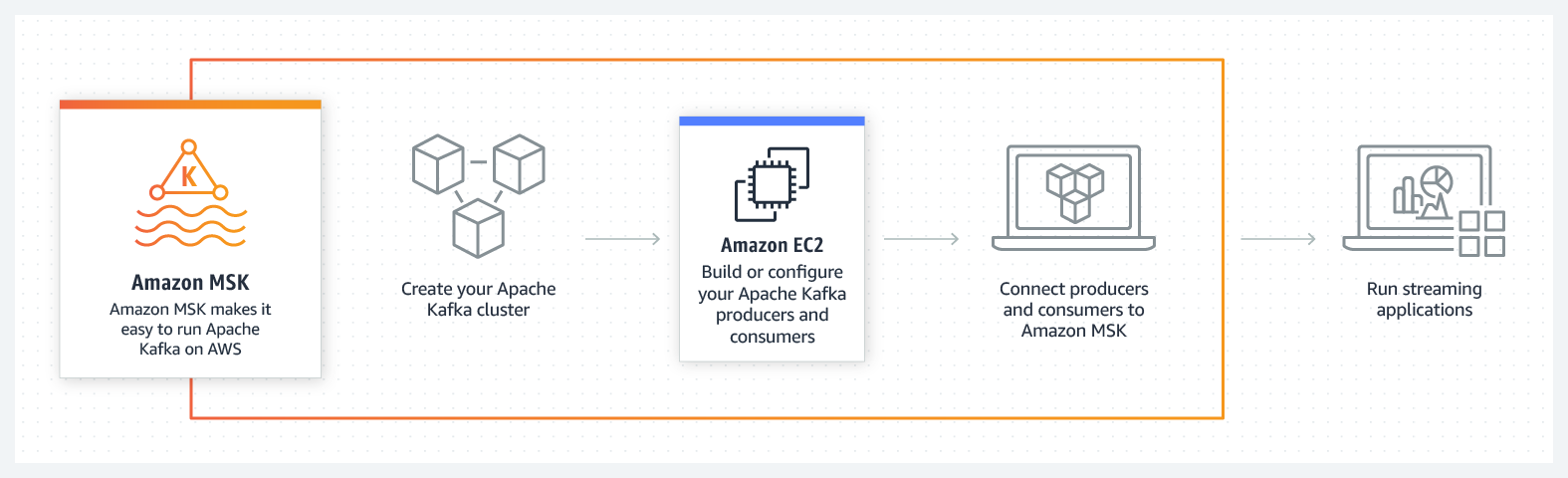
kafka
In addition, Amazon MSK continuously monitors cluster performance and replaces faulty nodes with new ones to ensure smooth app functioning. It also provides top-notch security to Kafka clusters by enabling end-to-end data encryption. 

Benefits of Amazon MSK

Amazon MSK provides a fully managed, secure, and more efficient way to run, manage and deploy Apache Kafka clusters. Below are the main enterprise benefits of using Amazon Managed Streaming for Apache Kafka. 

Fully Managed

Amazon MSK enables developers to build scalable streaming applications with Kafka without using Apache Kafka infrastructure. It also eliminates the requirement of procuring provisional servers as the clusters can be managed directly on the AWS cloud. In addition, it significantly reduces the complexities related to configuration and maintenance of Kafka clusters and Apache ZooKeeper nodes. 

Compatibility

Amazon MSK renders open-source compatibility and provides full support for third-party tools like Apache Flink, Spark, and HBase. It is also fully compatible with tools like Flume, Storm, Prometheus, and MirrorMaker.

Security

It provides multi-fold security for Kafka clusters at different levels of operations. The top-tier security rendered by Amazon MSK includes VPC network isolation, control-plane API authorization, TLS-based authentication, in-transit encryption and data-plane authorization.

High Availability

Amazon Managed Streaming for Kafka enables multi-AZ replication for Apache Kafka clusters on the AWS cloud. As already mentioned, Amazon MSK continuously monitors Kafka clusters and automatically replaces them in case of the component failure. 


Closing Thoughts

Apache Kafka is an extremely useful software that possesses higher throughput and replication characteristics, making it ideal for tracking IoT sensors with high accuracy. Developers can also use it in combination with other tools like Flume, Spark, Flink, Storm, and HBase. However, using Amazon Managed Streaming for Kafka gives you better flexibility and elasticity to easily accomplish complex development and deployment tasks. 

Avail Our AWS Development Services To Streamline Your IT Operations

We are an experienced cloud app development company that specializes in building cloud-based live video streaming apps with custom features. Our development team is skilled at using Amazon MSK platform to build, deploy, and scale feature-rich cloud applications with Apache Kafka’s seamless real-time streaming capabilities. Our end-to-end AWS cloud services include design, development, deployment, scaling, and QA testing to ensure that your app performs smoothly across the supported devices.

Sunday, June 21, 2020

An Introduction To Kafka Architecture and Kafka as a Service

Kafka and Kafka as a Service

Apache Kafka is a fast and scalable Publish/Subscribe messaging platform. It enables the communication between producers and consumers using messaging-based topics. It allows producers to write records into Kafka that can be read by one or more consumers per consumer group. It's becoming a solution for big data and microservices applications. It is being used by several companies to solve the problem of real-time processing. AWS development services also render support for Apache Kafka via its fully managed Amazon MSK (Amazon Managed Streaming for Kafka) platform.

A Broker is like a Kafka server that runs in a Kafka Cluster. Kafka Brokers form a cluster. The Kafka Cluster consists of many Kafka Brokers on several servers. Brokers often refer to more of a logical system or as Kafka as a whole.

It uses ZooKeeper to manage the cluster. ZooKeeper is used to coordinate the brokers/cluster topology. ZooKeeper gets used for leadership elections for Broker Topic Partition Leaders.

The Kafka architecture consists of four main APIs on which Kafka runs.
  1. Producer API:
This API allows an application to publish a stream of records to one or more Kafka topics.

Consumer API

It allows an application to subscribe to one or more topics. It also allows the application to process the stream of records that are published to the topic(s).

Streams API

This streams API allows an application to act as a stream processor. The application consumes an input stream from one or more topics and produces an output stream to one or more output topics thereby transforming input streams to output streams.

Connector API

This connector API builds reusable producers and consumers that connect Kafka topics to applications and data systems.

Kafka Cluster Architecture


Kafka architecture can also be described as a cluster with different components. 

Kafka Broker

A Kafka cluster often consists of many brokers. One Kafka broker can be used to handle thousands of reads and writes per second. However, since brokers are stateless they use Zookeeper to maintain the cluster state.

Kafka ZooKeeper

This uses ZooKeeper to manage and coordinate Kafka brokers in the cluster. The ZooKeeper notifies the producers and consumers when a new broker enters the Kafka cluster or if a broker fails in the cluster. On being informed about the failure of a broker, the producer and consumer decide how to act and start coordinating with other active brokers. 

Kafka Producers

This component in the Kafka cluster architecture pushes the data to brokers. It sends messages to the broker at a speed that the broker can handle. Therefore, it doesn’t wait for acknowledgments from the broker. It can also search for and send messages to new brokers exactly when they start.

Kafka Consumers

Since brokers are stateless, Kafka consumers maintain the number of messages that have been consumed already and this can be achieved using the partition offset. The consumer remembers each message offset which is an assurance that it has consumed all the messages before it. 


Kafka cluster setup via Docker

version: '2'

services:

  zookeeper:

    image: wurstmeister/zookeeper

    ports:

      - "2181:2181"

  kafka-1:

    image: wurstmeister/kafka

    ports:

      - "9095:9092"

    environment:

      KAFKA_ADVERTISED_HOST_NAME: kafka1

      KAFKA_ADVERTISED_PORT: 9095

      KAFKA_ZOOKEEPER_CONNECT: zookeeper:2181

      KAFKA_LOG_DIRS: /kafka/logs

      KAFKA_BROKER_ID: 500

      KAFKA_offsets_topic_replication_factor: 3

    volumes:

      - /var/run/docker.sock:/var/run/docker.sock

      - kafka_data/500:/kafka


  kafka-2:

    image: wurstmeister/kafka

    ports:

      - "9096:9092"

    environment:

      KAFKA_ADVERTISED_HOST_NAME: kafka2

      KAFKA_ADVERTISED_PORT: 9096

      KAFKA_ZOOKEEPER_CONNECT: zookeeper:2181

      KAFKA_LOG_DIRS: /kafka/logs

      KAFKA_BROKER_ID: 501

      KAFKA_offsets_topic_replication_factor: 3

    volumes:

      - /var/run/docker.sock:/var/run/docker.sock

      - kafka_data/501:/kafka


  kafka-3:

    image: wurstmeister/kafka

    ports:

      - "9097:9092"

    environment:

      KAFKA_ADVERTISED_HOST_NAME: kafka3

      KAFKA_ADVERTISED_PORT: 9097

      KAFKA_ZOOKEEPER_CONNECT: zookeeper:2181

      KAFKA_LOG_DIRS: /kafka/logs

      KAFKA_BROKER_ID: 502

      KAFKA_offsets_topic_replication_factor: 3

    volumes:

      - /var/run/docker.sock:/var/run/docker.sock

      - kafka_data/502:/kafka

Start The Cluster

Simply start the cluster using the docker-compose command from the current directory:
$ docker-compose up -d

We can quickly check which nodes are part of the cluster by running a command against zookeeper:
$ docker-compose exec zookeeper ./bin/zkCli.sh ls /brokers/ids

And that’s it. We’ve now configured a kafka cluster up and running. We can also test failover cases or other settings by simply bringing one kafka node down and seeing how the clients react.

Self-managed Kafka Services

We can also use Cloud-based self-managed kafka service on different cloud providers. AWS cloud services provide fully managed and secure Apache Kafka service like Amazon MSK (Amazon Managed Streaming for Apache Kafka).

Thursday, October 5, 2017

Kafka Configuration with SpringBoot

Kafka is a distributed streaming platform.


1. It keep running as a group on at least one cluster.

2. The Kafka group stores surges of records in classes called points.

3. Each record comprises of a key, an esteem, and a timestamp.

4. Kafka is quick.

It performs 2 million transactions per second.This makes it simple to exchange information from page reserve to arrange attachment. Kafka is high throughput frameworks. Kafka works extremely well as a swap for some more conventional message specialist like RabbitMQ, ActiveMQ and so forth.


There are different benefits of Kafka:

1.Reliable
2.Scalable
3.Durable
4.Performance


Installation steps:

Step 1 — Install Java
sudo apt-get update
sudo apt-get install default-jre


Step 2 — Install ZooKeeper
sudo apt-get install zookeeperd
telnet localhost 2181


Step 3 — Download and Extract Kafka Binaries
mkdir -p ~/Downloads
wget "http://mirror.cc.columbia.edu/pub/software/apache/kafka/0.8.2.1/kafka_2.11-0.8.2.1.tgz" -O ~/Downloads/kafka.tgz


Step 4 — Configure Kafka Server
Open server.properties using vi:
vi ~/kafka/config/server.properties
delete.topic.enable = true


Step 5 — Start the Kafka Server
nohup ~/kafka/bin/kafka-server-start.sh ~/kafka/config/server.properties > ~/kafka/kafka.log 2>&1 &
Configure Kafka with SpringBoot:

Step1 : Maven Dependency

<?xml version="1.0" encoding="UTF-8"?>
<project xmlns="http://maven.apache.org/POM/4.0.0" xmlns:xsi="http://www.w3.org/2001/XMLSchema-instance"
  xsi:schemaLocation="http://maven.apache.org/POM/4.0.0 http://maven.apache.org/xsd/maven-4.0.0.xsd">
  <modelVersion>4.0.0</modelVersion>

  <groupId>com.codenotfound</groupId>
  <artifactId>spring-kafka-helloworld</artifactId>
  <version>0.0.1-SNAPSHOT</version>

  <name>spring-kafka-helloworld</name>
  <description>Spring Kafka - Consumer Producer Example</description>
  <url>https://www.codenotfound.com/spring-kafka-consumer-producer-example.html</url>

  <parent>
    <groupId>org.springframework.boot</groupId>
    <artifactId>spring-boot-starter-parent</artifactId>
    <version>1.5.4.RELEASE</version>
  </parent>

  <properties>
    <java.version>1.8</java.version>

    <spring-kafka.version>1.2.2.RELEASE</spring-kafka.version>
  </properties>

  <dependencies>
    <!-- spring-boot -->
    <dependency>
      <groupId>org.springframework.boot</groupId>
      <artifactId>spring-boot-starter</artifactId>
    </dependency>
    <dependency>
      <groupId>org.springframework.boot</groupId>
      <artifactId>spring-boot-starter-test</artifactId>
      <scope>test</scope>
    </dependency>
    <!-- spring-kafka -->
    <dependency>
      <groupId>org.springframework.kafka</groupId>
      <artifactId>spring-kafka</artifactId>
      <version>${spring-kafka.version}</version>
    </dependency>
    <dependency>
      <groupId>org.springframework.kafka</groupId>
      <artifactId>spring-kafka-test</artifactId>
      <version>${spring-kafka.version}</version>
      <scope>test</scope>
    </dependency>
  </dependencies>

  <build>
    <plugins>
      <!-- spring-boot-maven-plugin -->
      <plugin>
        <groupId>org.springframework.boot</groupId>
        <artifactId>spring-boot-maven-plugin</artifactId>
      </plugin>
    </plugins>
  </build>
</project>


Step 2: kafka Sender

public class Sender {

  private static final Logger LOGGER = LoggerFactory.getLogger(Sender.class);

  @Autowired
  private KafkaTemplate<String, String> kafkaTemplate;

  public void send(String topic, String payload) {
    LOGGER.info("sending payload='{}' to topic='{}'", payload, topic);
    kafkaTemplate.send(topic, payload);
  }
}


Step 3: kafka consumer

public class Receiver {

  private static final Logger LOGGER = LoggerFactory.getLogger(Receiver.class);

  private CountDownLatch latch = new CountDownLatch(1);

  public CountDownLatch getLatch() {
    return latch;
  }

  @KafkaListener(topics = "${kafka.topic.helloworld}")
  public void receive(String payload) {
    LOGGER.info("received payload='{}'", payload);
    latch.countDown();
  }
}
Read more at - http://www.oodlestechnologies.com/blogs/Kafka-Configuration-with-SpringBoot