Showing posts with label MobileApp. Show all posts

Sunday, July 12, 2020

New Features and Updates Coming To iOS 14


Apple recently announced its iOS 14 update coming this fall to the supported iPhone and iPad devices during its Worldwide Developers Conference (WWDC) in June 2020. Being a major iOS update, it is expected to bring significant changes, enhancements, and several new features to the iPhone/iPad users. 

Apple proclaims that iOS 14 is going to be their biggest update to this date. It brings home screen design changes, new modified features, updates for existing apps, Siri improvements, and many other major features to improve the iOS interface.

Let’s delve deeper into the new features, changes, and enhancements that are expected to roll out with this major iOS update.


Features

Home Screen Changes

iOS 14 introduces new design features for the Home Screen with better personalization. Users can customize it using the available widgets. In addition, there will be a new App Library and options to hide the entire pages of various apps, and much more.

Widgets

Earlier, widgets were available on the Today screen. But the iOS 14 update has brought a whole new look with completely redesigned widgets to give you more information at a glance. The widgets can be added to the home screen and adjusted as you like. You can choose from multiple sizes and stack widgets simply by dragging one over the other. In addition, iOS 14 brings smart widgets that automatically surfaces the widget option based on time, location, and activity.

App Library

iOS 14 has come up with this new feature called App Library which is positioned at the end of the Home Screen. The App Library automatically organizes all your apps into specific folders such as social, health and fitness, educational, and so on. There is also a folder for Apple Arcade that lets you explore the various features that you can unlock in games. Besides, the App Library provides different folders for recently added apps and suggestions, that show recommended apps based on time of day, location, and user activity. Furthermore, you can hide apps that you don’t want on your home screen. Instead, they will appear in the App Library. In a nutshell, iOS 14 brings in a more efficient way to organize your apps.

Compact Calls

With iOS 14, incoming calls from your iPhone, FaceTime, or third-party apps do not cover up the entire screen. Instead, they show up as a small banner at the top of your screen. You can swipe up to dismiss it or swipe down to answer it and see more call options. In case the phone is locked, you’ll see the standard phone call interface.

Picture in Picture

The Picture-in-Picture feature on the iPad is now extended to the iPhone with iOS 14. This feature enables you to keep watching a video or continue your FaceTime call while using another app in unison. The windowed view of the video or the FaceTime call will show up in the corner of the screen. It can be relocated and adjusted as per your convenience.

Messages

iOS 14 offers a number of new ways to stay connected to conversations that matter the most. It provides several new tools to customize your conversations with photos, emojis, and Memojis the way you like. You can pin your most important conversations to the top of your conversation list for easy access. This can be done for up to 9 conversations. With features like inline replies and mentions, you can direct a message to a specific person in a group chat.

In case of mentions, the name of the person you mention gets highlighted. You can also customize your group conversations to receive notifications only when you are mentioned. Besides, there are a bunch of new options for Memoji styles and stickers. You can choose from over 20 different hair and headwear styles that suit your personality, hobby, or profession.

Siri

With iOS 14, Siri has a new compact design with a host of new features. It is better equipped with translation functionality and an even more extensive base of knowledge. You can also record and send audio messages with Siri.
 

Maps

The Maps feature mostly looks the same. However, there are some useful features for those who have electric vehicles and those who like to bike. You can now get cycling directions using Maps. It shows you if there’s an elevation, stairs, or steep passages in your way. It also lets you see how busy the street is.

The electric vehicle routing feature shows all the charging stations along your planned route. Additionally, the Guides option in Maps shows a variety of places in a city to eat, shop, and explore.
 

Translate

Previously, translation capability was just a function of Siri in iOS 13. But now with iOS 14, Apple now has a completely new Translate app. It is designed for supporting conversations across 11 different languages.

Turning your iPhone to landscape mode will initiate conversation mode. It also has the ability to automatically detect the language you speak. The app has an offline translation mode that enables you to download languages and keep your translations private.
 

Home

The Home app has several new useful features that let you manage your smart home more effectively. With iOS 14, you have new automated suggestions and expanded controls in the control center. The app also provides services like Adaptive Lighting for compatible lights. It will automatically adjust your lights with the color temperature throughout the day. The face recognition feature can easily identify your friends and family with the information it already has.

Safari

With iOS 14, Safari is more responsive and enables new ways to protect your privacy. It can translate websites in 7 different languages. Besides, its password monitoring feature lets you detect saved passwords that may have been breached.


Car Keys and CarPlay

Using iOS 14, you can unlock and start your car with your iPhone. Your digital key is stored in the wallet app. You can easily share this key with friends or family through a messaging app. The Car Keys feature also lets you customize controls and restrict certain profiles as per your preferences. It works up to 5 hours even after your iPhone’s battery runs out.

CarPlay feature supports customizable wallpaper which lets you personalize your CarPlay dashboard and home screen looks. It also lets you download apps like parking, electric vehicle charging, and quick food ordering.
 

AirPods

With iOS 14, AirPods are now able to switch automatically between iPhone, iPad, Mac, and Apple Watch according to which device you are using. The new battery notification lets you know when your AirPods need charging.
 

App Clips

App Clips lets you access a small part of an app without having to download the full app. Using this facility you can rent a bike, pay for parking, order food, and do much more right at the time of need. It is fast, easily accessible, and transactions are safe with apps that use Apple Pay.
 

Privacy

With iOS 14, you get information on the privacy practices of every app in the App Store before downloading it. Also, all apps will need user permission before keeping a track of their activities. Whenever an app uses your microphone or camera, an indicator appears at the top of your screen. You can see if any app has used them recently in the Control Center. In addition, you can share only your approximate location instead of your exact location.

 
At Oodles, we have gained extensive experience in providing iOS application development company. We specialize in developing user-centric mobile applications with smart integration capabilities for intelligent features. Our development team is skilled at providing SaaS App Development Company ranging from architecture, development, optimization, maintenance, and much more.

Our Other Service

#VideoStreaming #AppDevelopment #IoTDevelopmentCompany #SaaSApp #DevelopmentCompany  #iOSapplication #Developmentcompany

Monday, February 10, 2020

Simplifying Mobile App Development Using Flutter


That being said, developing applications separately for Android, iOS, and other mobile platforms using different tools is both expensive and time-consuming. The rapidly changing market trends and dynamically changing business requirements have paved the way for cross-platform mobile app development. There are several tools and frameworks that enable developers to build cross-platform mobile apps for different mobile platforms. The most commonly used frameworks are React Native, Flutter, Ionic, and Apache Cordova. 

Flutter is a Google-owned mobile framework that is relatively new to the market and offers several benefits over the other similar frameworks. At Oodles, we have received many requests for mobile app development specifically using Flutter. The main reason behind the increasing demand for Flutter mobile app development is the quick deployment and reduced time-to-market. In this blog post, we are going to discuss the key benefits of using Flutter for cross-platform mobile app development. 


What Is Flutter? How It Improves Mobile App Development?

Flutter is an open-source mobile application framework that is run and maintained by Google. It was launched in May 2017 with the sole aim to simplify and accelerate the mobile application development process. The framework was designed to develop native mobile interfaces for popular mobile operating systems like Android and iOS. Later on, Google also rendered support for Windows, Mac, Linux, Fuchsia, and web applications. As of today, the framework is being used by a large community of developers to build feature-rich web and mobile applications. Below are the key benefits of using Flutter for mobile application development. 

Faster Code Execution

The main benefit of using Flutter is that it accelerates the development process with faster code execution which reduces complexities and time-to-market. With its “hot reload” feature, developers can make dynamic changes in code and preview them instantly before pushing it further. The changes are reflected in milliseconds, making it fast and easy to add new features and functionalities to the app. 

The hot reload feature is also effective at improving the interactions between developers, designers, and QA testers. All these entities can work together on Flutter to quickly and efficiently finalize the app interface with simultaneous bug detection and resolution.  

Cross-platform Compatibility

Unlike many similar mobile app frameworks, Flutter requires a single codebase for both Android and iOS mobile app development processes. In addition, developers don’t need to build both apps separately. Flutter enables them to build multiple apps simultaneously with minimal code changes. Furthermore, it doesn’t require third-party applications or services as it comes with built-in widgets and plugins. All these factors contribute towards significantly reducing the development costs and accelerating the development process. 

Faster App Testing 

Flutter enables developers to build a single application that works perfectly for both Android and iOS platforms. It significantly reduces the complexities related to quality testing. Since you are only going to test a single app for both platforms, it makes the process time-saving and cost-effective. Flutter app development requires less effort from the QA engineers, so they can be allocated on other critical quality assurance tasks. 

Smooth App Performance

It’s been tried and tested that mobile apps developed using Flutter are lightweight, responsive, and work faster than their other counterparts. Besides, users get smooth navigation and multiple features under an intuitive and user-friendly interface. While you may require third-party tools to implement complex functionalities, Flutter is ideal for building simple, user-centric mobile apps with cross-platform compatibility.

Vast Options For UI Design

Flutter app development enables companies to create dynamic mobile apps with interactive, engaging, and intuitive user interfaces. It eliminates UI design complexities and makes it easy to map user journeys to drive significant user engagement across devices.  

You may also be interested in reading How to Merge a Flutter Project in Native Android Project

Closing Remarks

The aforementioned factors shed light on the significance of using Flutter for cross-platform mobile app development. The framework’s hot reload feature has made it easier than ever to make changes in real-time. The same feature also enables developers to release multiple app updates with minimal complexities. Flutter is also an effective tool to create a Minimum Viable Product (MVP) for your app and use it to drive investments. 

Why Choose Oodles For Flutter Mobile App Development?

We are a seasoned mobile app development company that provides full-scale Flutter app development services to clients. Our development team is experienced in building user-centric mobile apps using Flutter that perform seamlessly across Android and iOS platforms. We analyze your business requirements and formulate effective strategies to develop feature-rich mobile apps that overcome complex enterprise challenges.

Thursday, February 6, 2020

Choosing Flutter Over Other Native App Development Frameworks

Mobile app development is done using app development frameworks like Kotlin, Swift, React Native, React JS, and more. These frameworks decide the functionality of an app. Often native technologies make the app development process complex and time-consuming. To develop an application for both Android and iOS in a short duration mobile application developers are using Flutter. Flutter enables app developers to overcome the issues of native app development. Our Flutter App Developers receive requests for scalable and feature-rich that offers seamless navigation to the users of the app. 

Flutter is an open-source, cross-platform, Mobile SDK used to build Android and iOS apps using the same source code. Flutter is managed by Google and it is the first stable SDK released in Dec 2018. Flutter supports all native features to develop the native app or we can say that Flutter provides a platform to build the application for both Android and iOS platforms.

Flutter vs Native Development
1 Native Mobile Application development takes more time to develop than Flutter 
2 Developer spend more times on UI Design in the native application as compare to the Flutter
3 Flutter is more productive and effective as compared to the native applications
4 Flutter makes thing easy than native SDK 
5 Native development takes more testing than Flutter
6 One time code reflects on both platform ios and android so it reduces the time to get the application
7 Flutter provides own rendering engine for both Android and iOS platforms
8 Flutter Mobile application development is better for small scale industries also
9 Flutter provides ready-made Widget For UI Development
10 Flutter provides Hot Reload Function to updates

 Basic Terminologies in Flutter
1 Technical Architecture 
2 UI Components 
3 Testing
Technical Architecture
Native development architecture is different from Flutter architecture. native development normally is done on its SDK and Frameworks but in Flutter application development we use IntelliJ Idea(IDE), Android Studio or any other text editors like Sublime Text or Atom. 
UI Components 
1 Most of the time developers spend their time in UI Design by using native UI Components but in Flutter UI components run on its rendering engines and framework.
2 Flutter uses a tree-like structure with the stateless and stateful widget. here we have lots of widgets in Flutter to build the complex UI Design.
Testing
1 Native Development provides its testing tool to test the application like Junit & XCTest but Flutter provides the testing tool to write the test cases for UI and functional level.
2 Widget Testing is a testing tool provide by Flutter to test the app at a different level. 


Flutter Mobile Application development is a fast-growing network after Google announced its first stable version. 

Are you planning to develop a feature-rich app? We are a Flutter app development company that delivers robust and scalable business apps for Android and iOS platforms. Get in touch with our experts to get the quote! 

Thursday, January 9, 2020

How to Merge a Flutter Project in Native Android Project

Flutter provides a comprehensive platform to develop feature-rich mobile application for Android and iOS platforms. By availing Flutter development services, organizations can build mobile applications from scratch or integrate Flutter modules in the existing native projects. After integration, we can develop the remaining part of the application in Flutter and this remaining part will automatically reflect in existing native projects.

Steps to Integrate Flutter project in native Android project
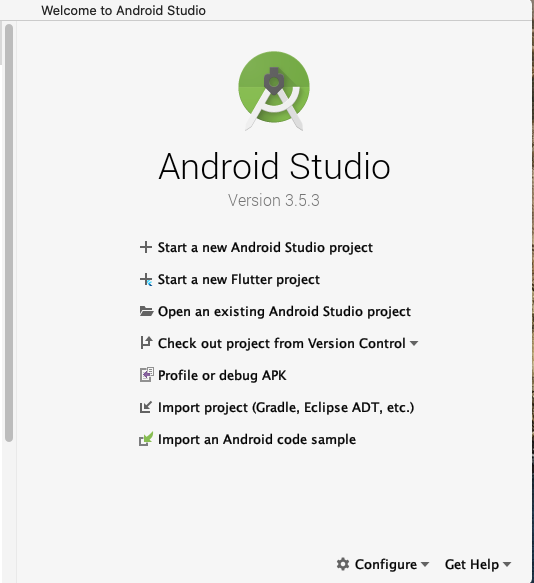
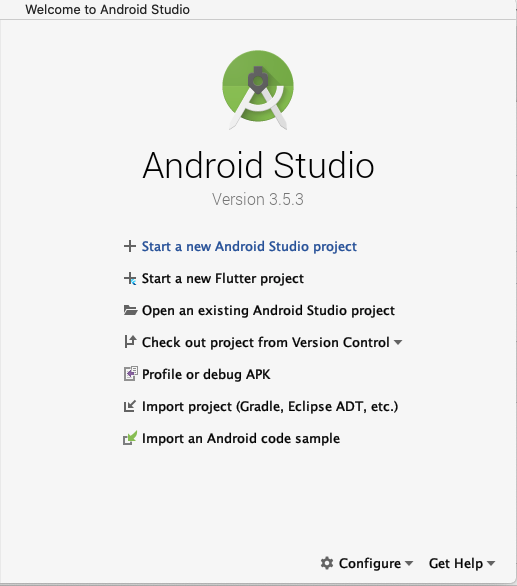
1 Open Android Studio


2 Select Start a new Android Project


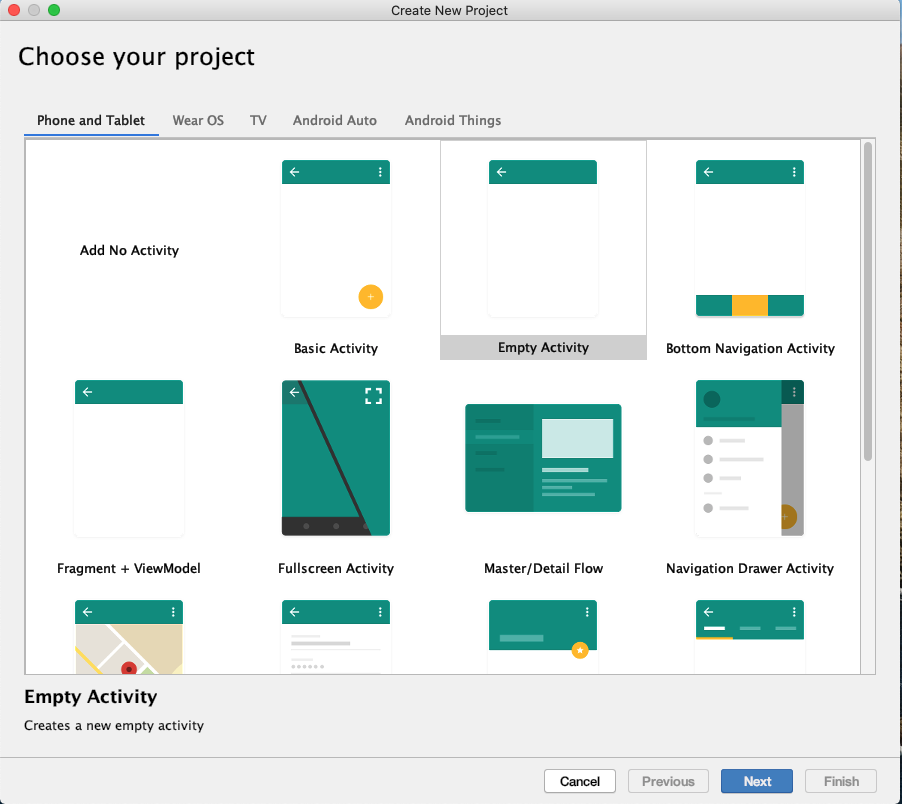
3 Select Empty Activity & Press Next


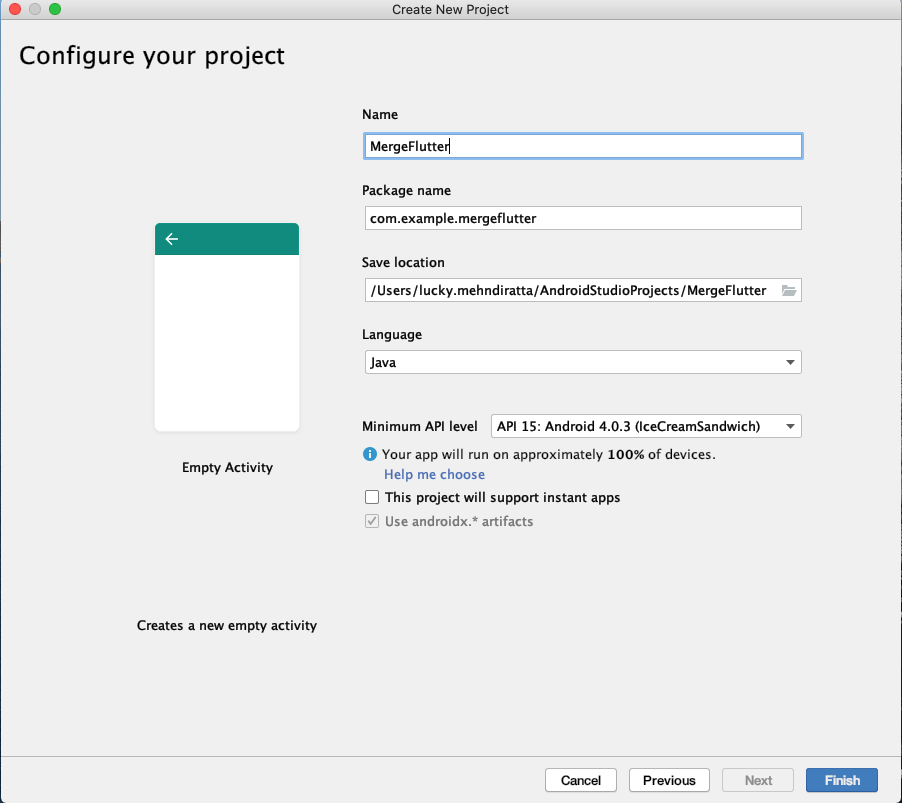
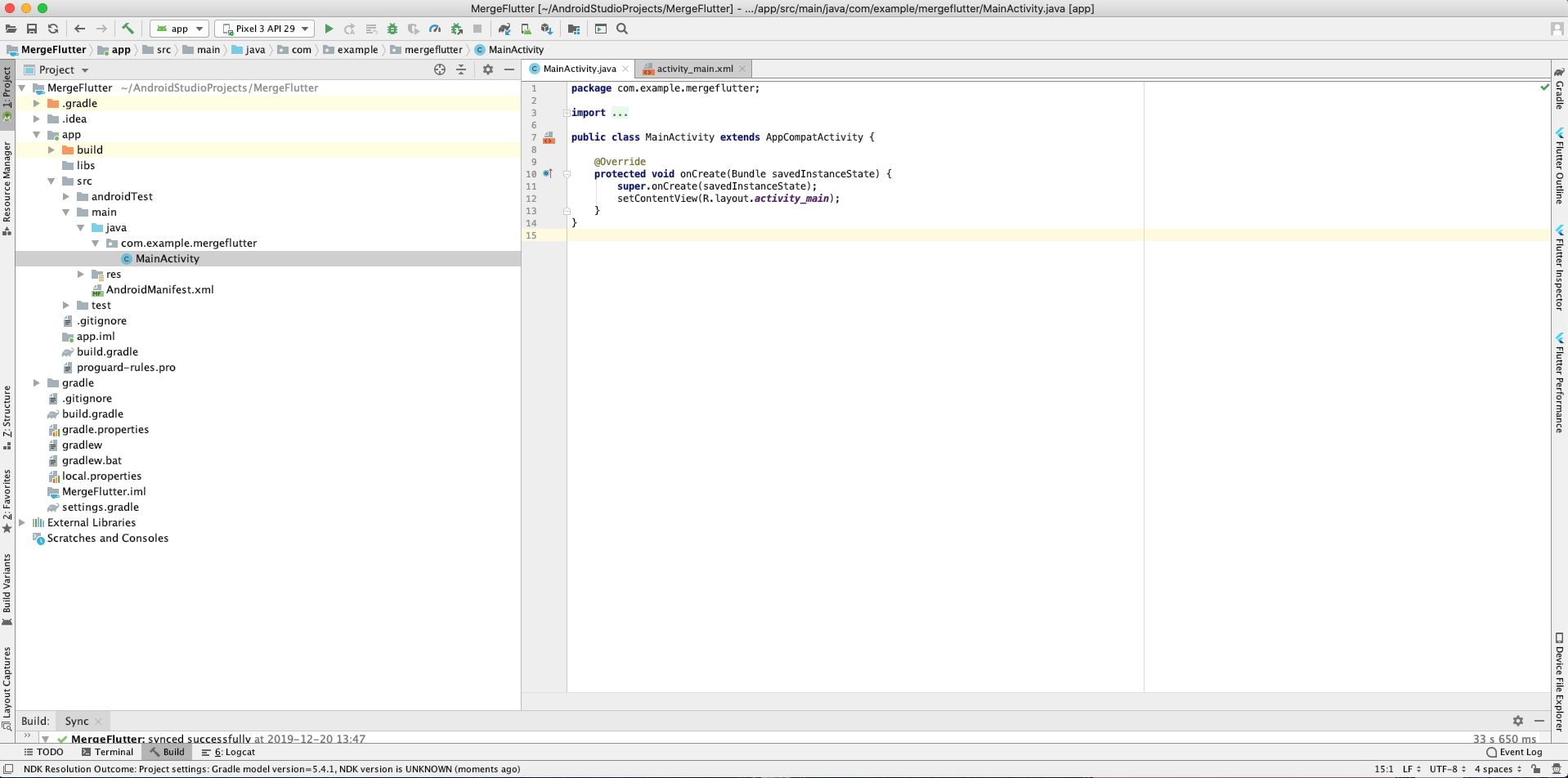
4 Set the Project name, location, language(Java/Kotlin) & minimum API level, then press Finish


5 Now Screen look like the this


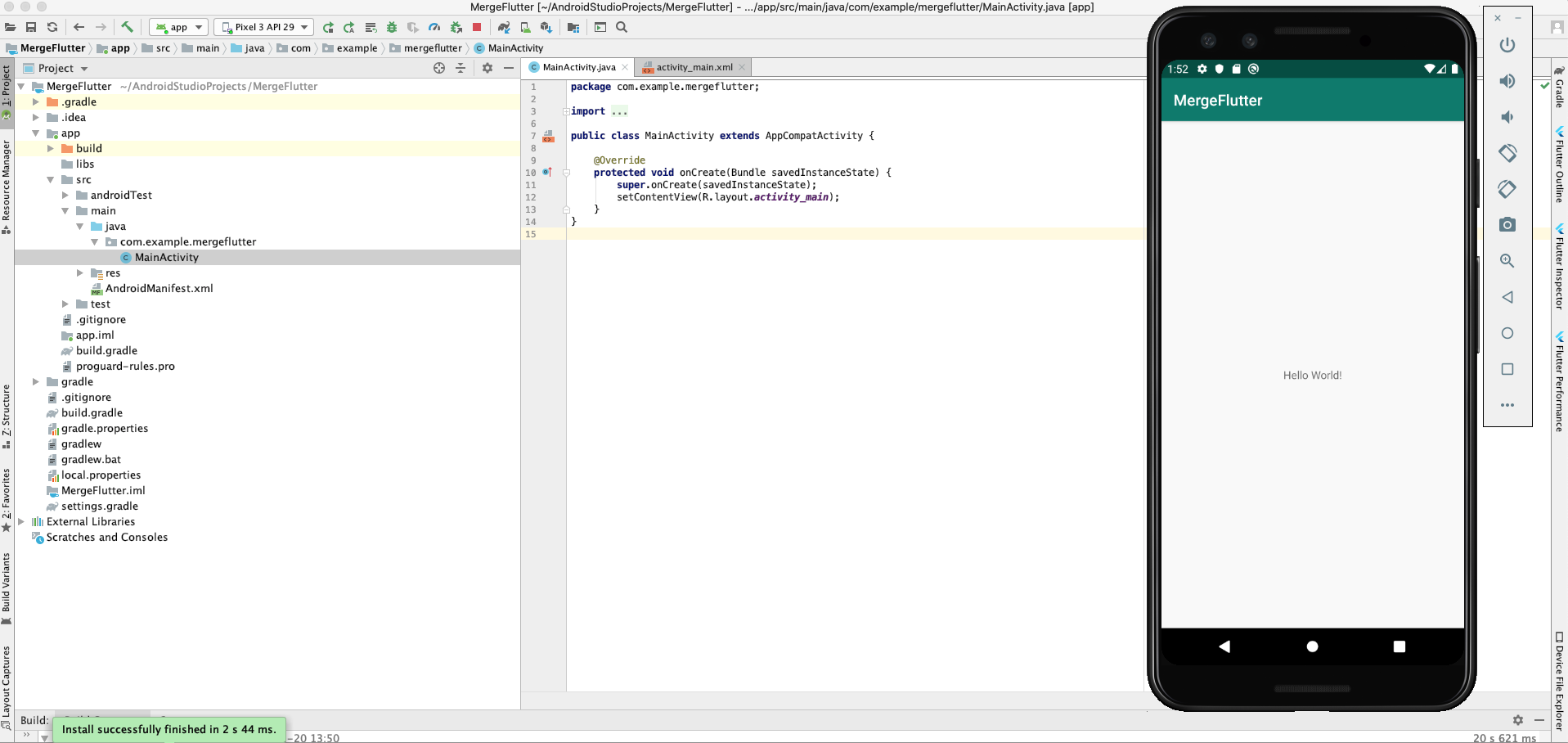
6 Run the Android Project by click on the run 


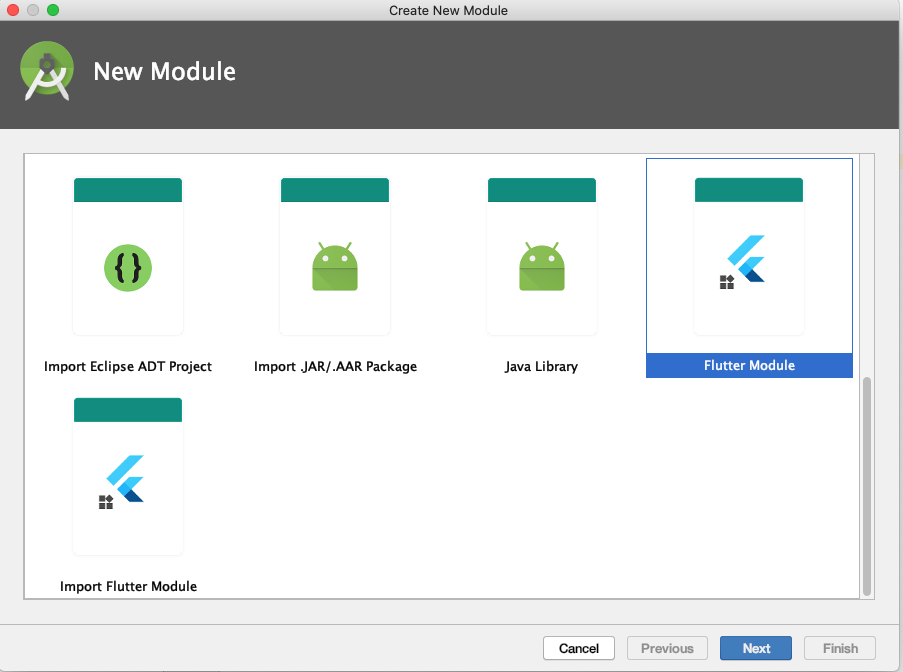
7 Now close android studio and start again Android Studio, this time select the New Flutter Project & Select Flutter Module 


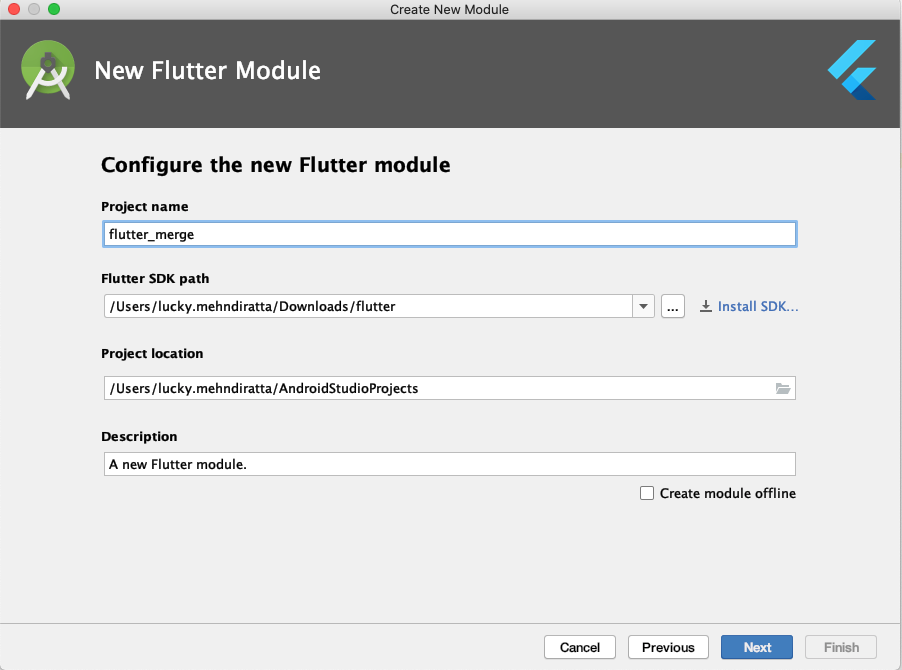
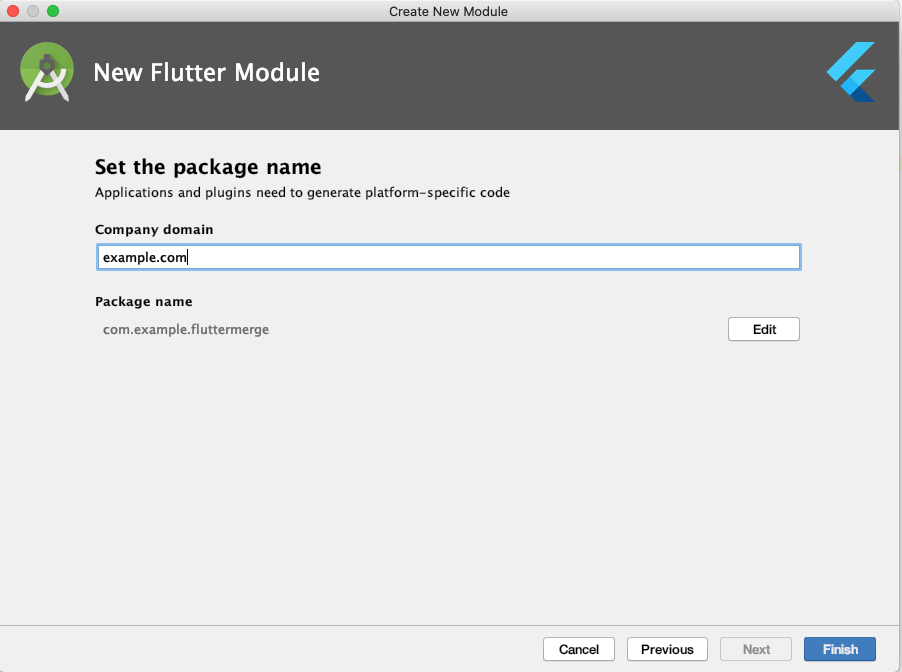
8 Set Project Name, Flutter SDK path, Project Location


9 Press Next and Finish


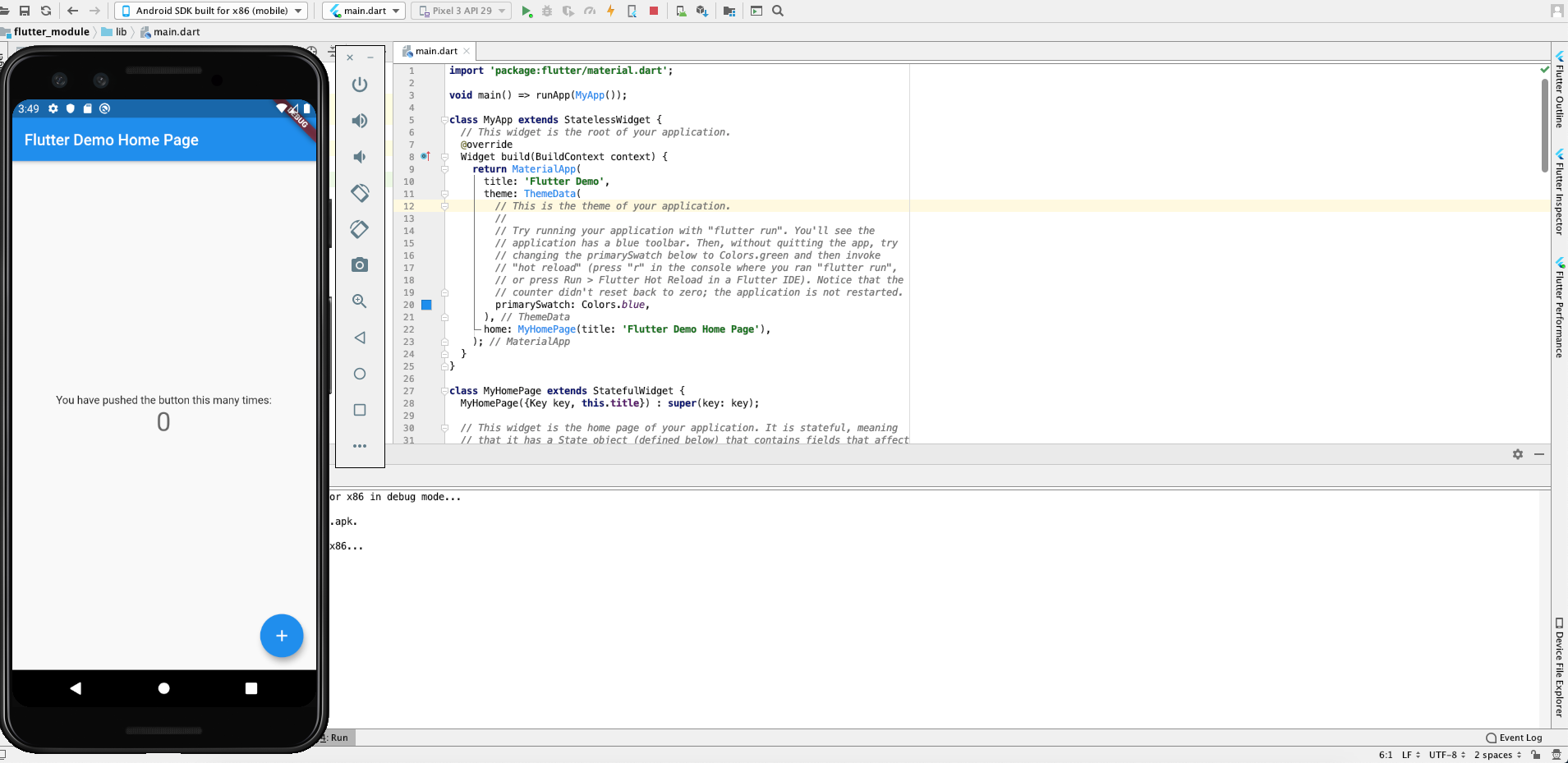
10 Run the Flutter Project 


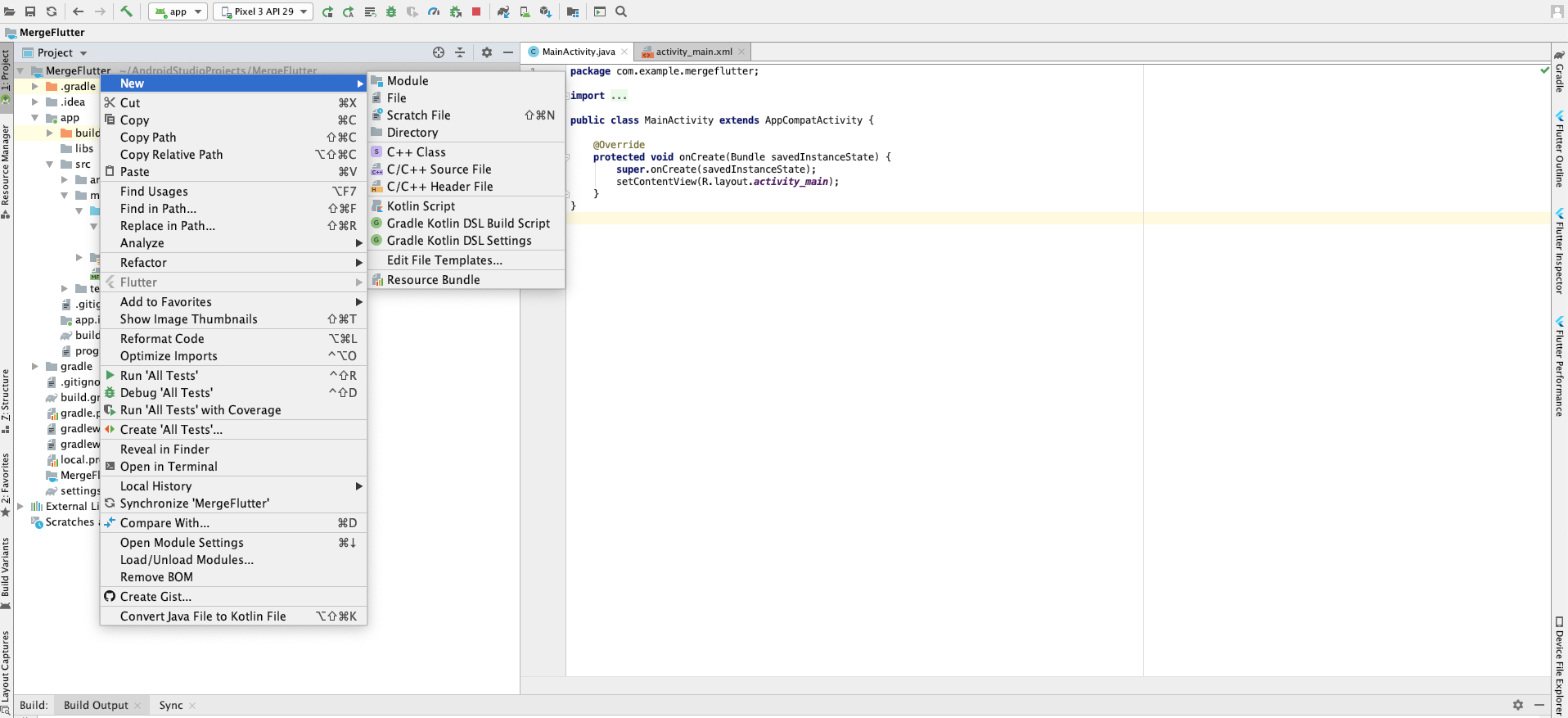
11 Now open native Android project(Step 1 to 6) and  right click on the project name -> New -> Module


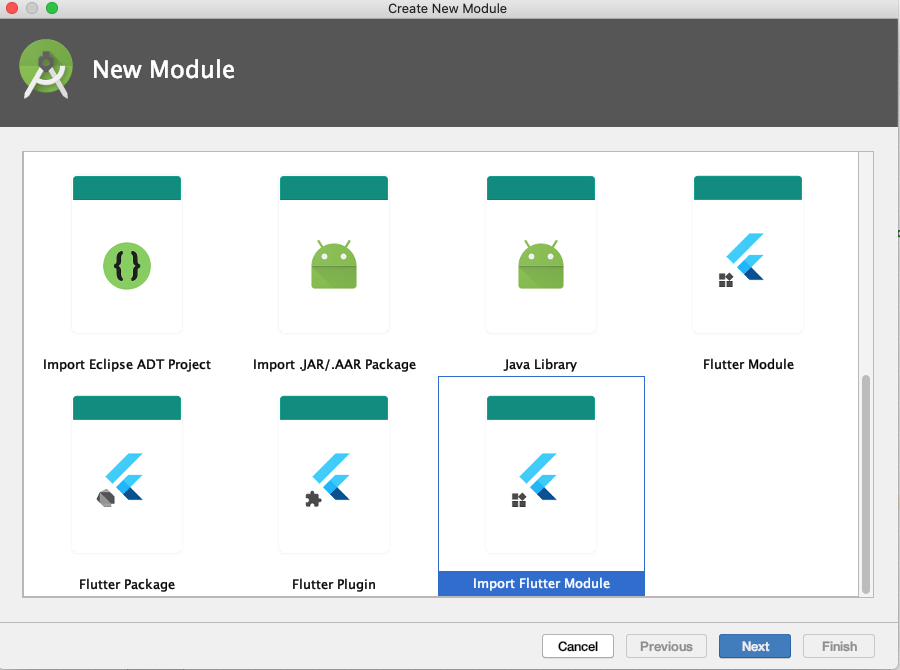
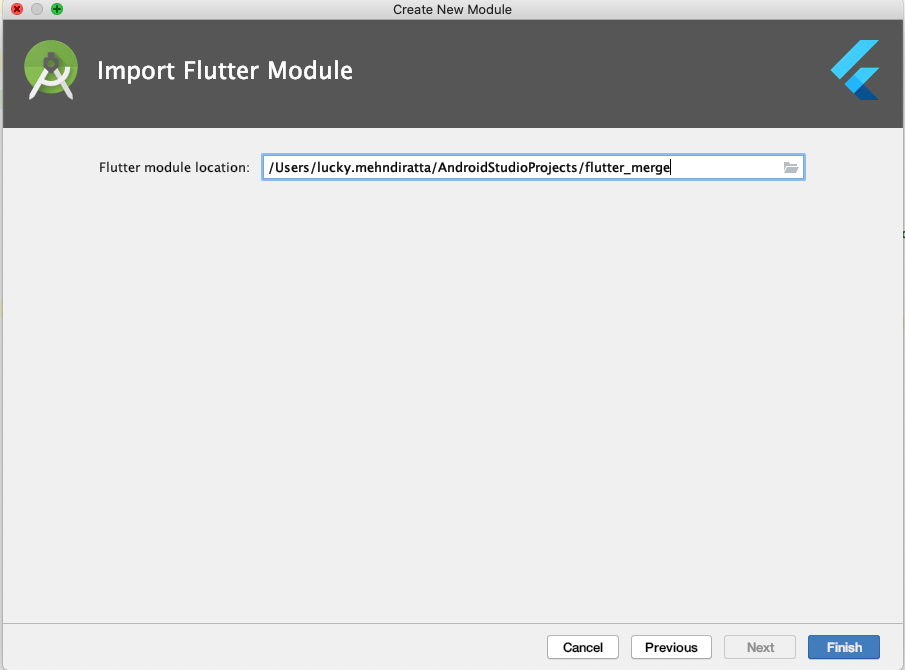
12 Select Import Flutter Module & presss Next


13 Select the Flutter Module path & Press Finish


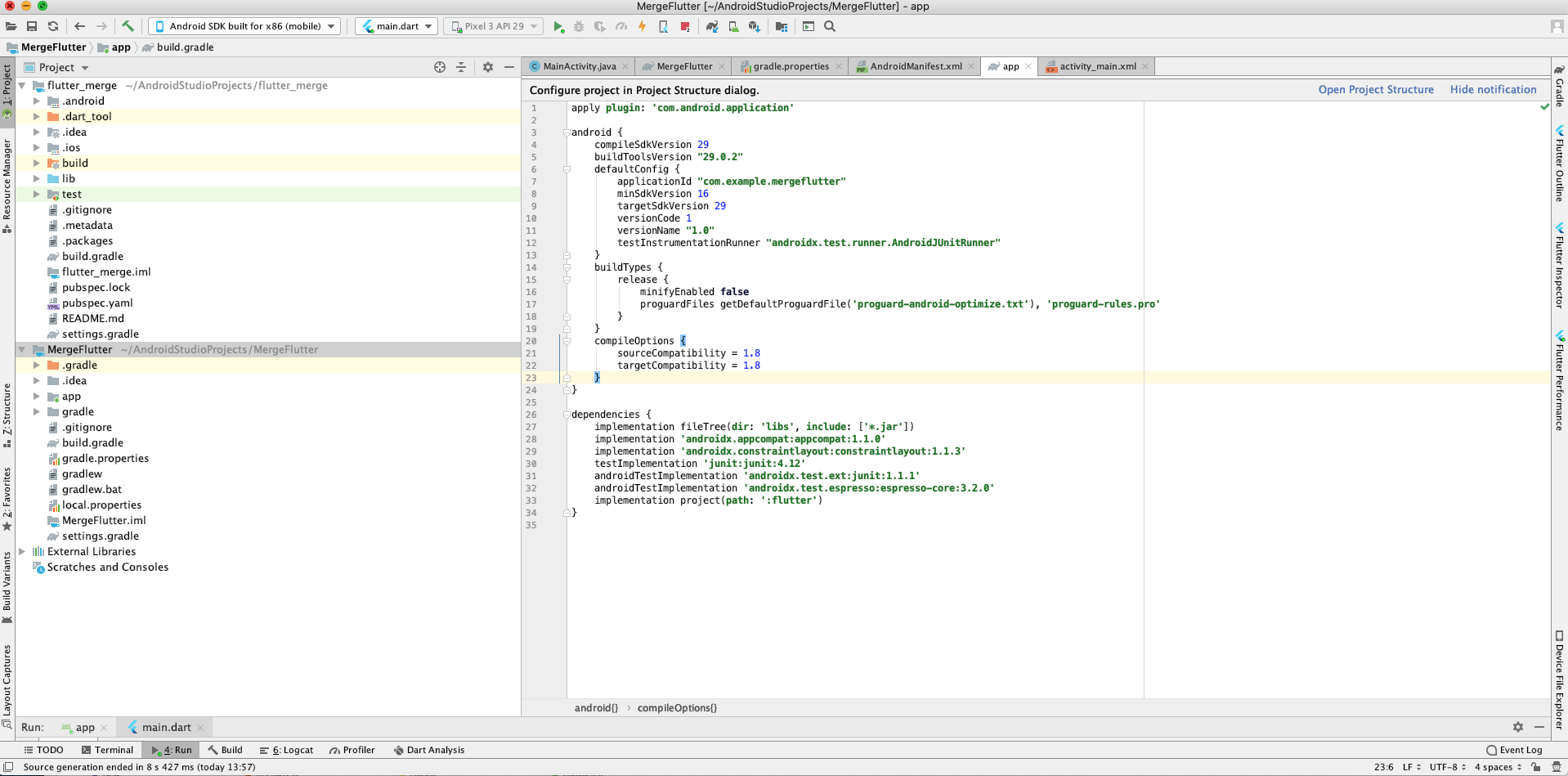
14 Now Project Structure look like this(Left Side)


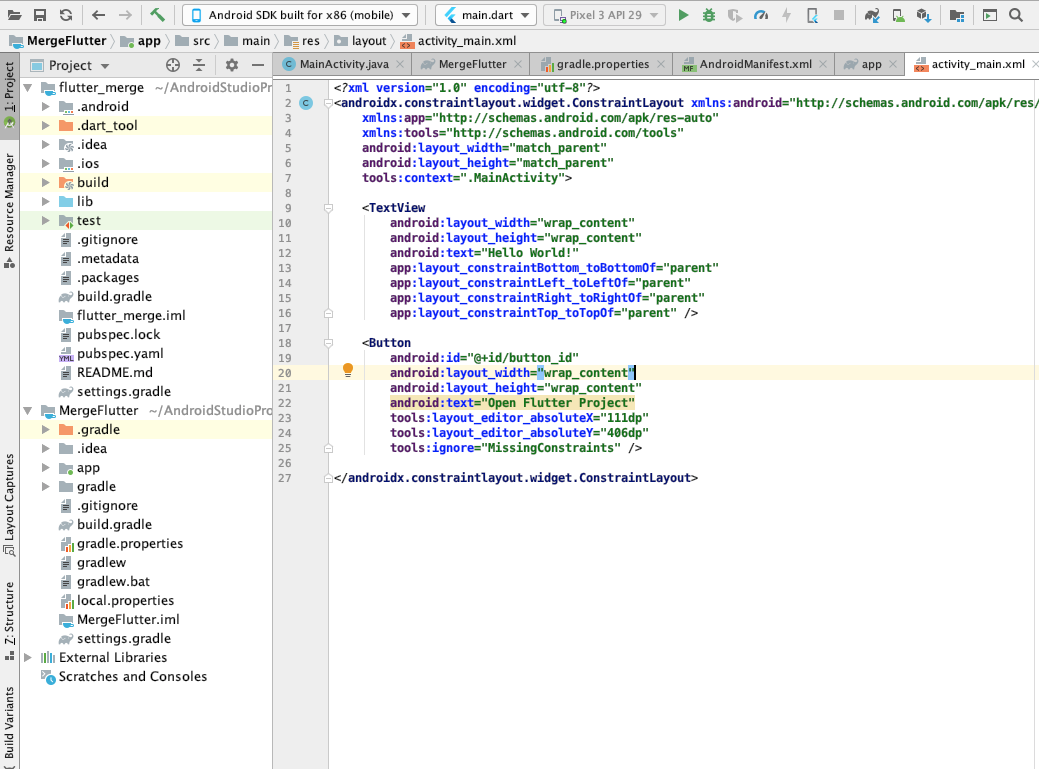
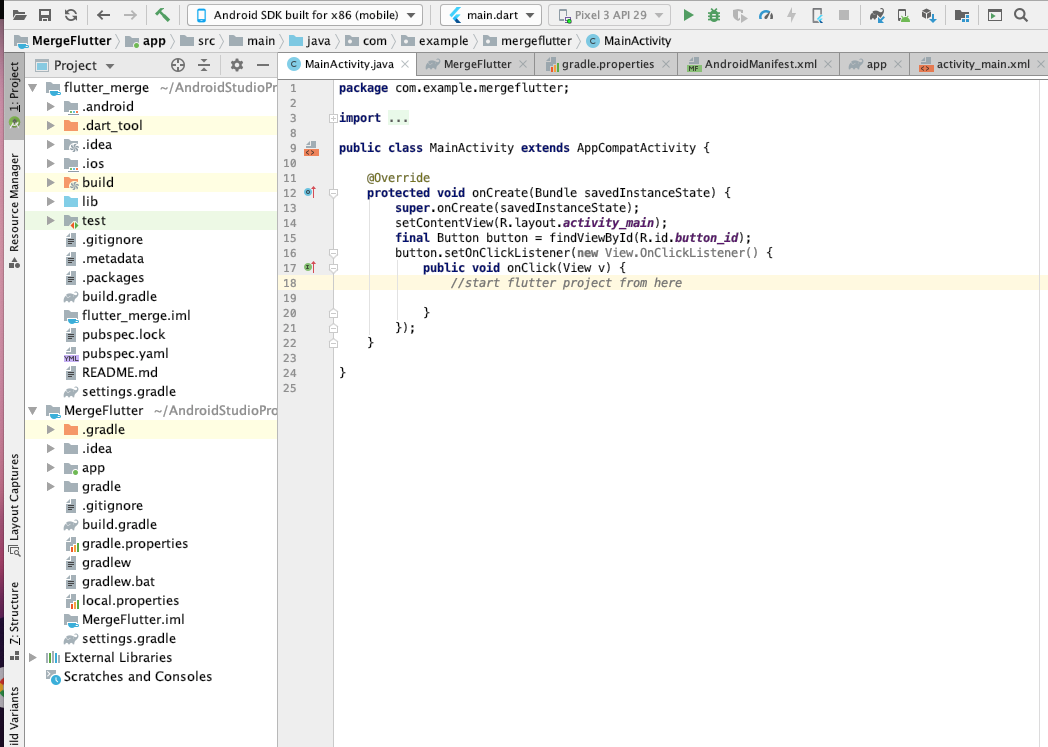
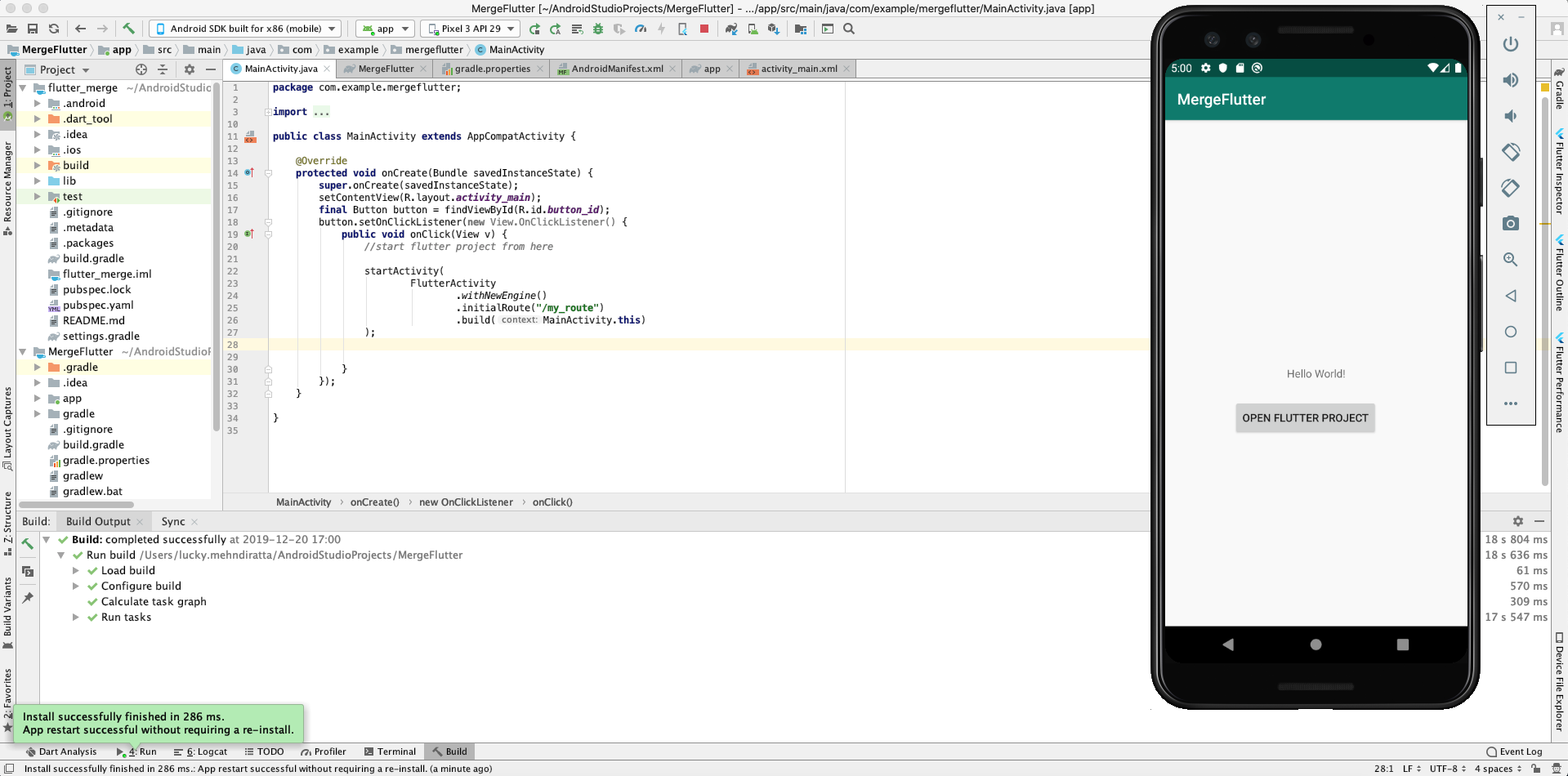
15 Now Create a button in android activity_main.xml file and listener in MainActivity.java File 


16 We use this Button to start our Flutter Module you can change this as per your requirement
17 Add the following line in AndroidManifest.xml File 
 <activity android:name="io.flutter.embedding.android.FlutterActivity" />

18 Add the following lines in Button Listener
 startActivity(
              FlutterActivity
              .withNewEngine()
              .initialRoute("/my_route")
              .build(MainActivity.this)
                );

19 Run the Android Project and click on Open Flutter Project Button.


20 Now Flutter project successfully integrates in the native Android project.

Note: Please attach Flutter SDK to Android Studio if you want to do this. 

Explore our mobile app develpment services to accelerate your mobile app development project and reduce time-to-market.

Monday, July 1, 2019

Reasons to Choose Node js for Web Application Development


Selecting a mobile application development framework that suits your business requirements is a challenging task. It is essential for developers to evaluate multiple options and select one that fulfills project requirements as comprehensively as possible. A typical evaluation exercise involves being able to answer the following questions -
  • Does the framework have a sizeable support community?
  • Is rapid application development possible?
  • Can the framework provide features essential for the project?
  • Does it provide scalability?
A technology framework that our mobile application development team at Oodles Technologies uses often is Node.js. Node.js is an open source JavaScript framework that provides a server-side development environment to develop real-time web and mobile applications. Apps designed with Node.js are fast and highly scalable. The framework uses non-blocking and event-based I/O model which is suitable for developing data-intensive, real-time web and mobile applications.
Let’s find out why Node.js is a popular framework for web application development:

Wednesday, April 17, 2019

Mobile App Development Company


Oodles Technologies, a prominent Mobile App Development Company in India, we have a team of professional Mobile application developers with hands-on experience in building top-notch apps. We stand out for our innovative approach and deliver the best-in-class application development services to the clients across the globe at affordable and competitive market rates. Get a full spectrum of our services and solutions for building seamless applications based on highly-secured framework and technologies. We also offer post-launch support and assistance to our valuable clients so that they could effortlessly stay ahead of the trends.

Thursday, September 14, 2017

Facebook Unveiled On This Day Changes And Milestones

Facebook has announced new “On This Day” features, in celebrating milestones related to their friendships on your Facebook feed. It is a two-year-old feature which revives your memory of old posts and photos. It is definitely a great feature as it suddenly pops a memory that is very close to your heart. But this feature could even bring back a memory with someone you have lost or with a person you are not in touch with. Facebook came up with this idea to recap your memories after a year or so. But now they are planning to show memories on a monthly and seasonal basis. 


Facebook will automatically collect your photos and you will get recaps of your memory which will be on the card for along with the share button. So they are completely shareable with your friends through your timeline. These cards will be categorized be specific season or months. So you might get a memory like your December memories. It has also announced another feature which will show your number of friends or crossed a certain number of likes. The new update is trying not to bring back the painful memories. Through “ On This Day” feature, Facebook is trying to bring joy and new experience in a very special way.  It believes that this is a new sharing feature which appears in the left column of your Feed under the apps tab. This feature is surely a treat to all the users from Facebook, as on opening Facebook you will be welcomed by a memory with your friend, family, relatives.


People have the trust that Facebook is securely saving their pictures and they can easily scroll their timelines whenever they want to see their special moments like the new job, a date you got married or engaged and much more. For choosing the memory, Facebook uses a sophisticated algorithm that tells which memories are good to show and which are not.