Showing posts with label SaaS Application Services India. Show all posts

Tuesday, September 8, 2020

Time Tracking Software Development In Australia, USA, UK

 Explore our offerings in time tracking software development in Australia, USA, UK. 

An effective time tracking system is essential to remotely monitor employee tasks, team performance, and other mission-critical work activities. As the novel coronavirus pandemic has taken the world by storm, a majority of employees in various companies have been forced to work from home. That being said, remote collaboration has become the only way to keep the operations up and running at all times. Being a quintessential part of remote collaboration, time tracking software development is in great demand these days. 


We, at Oodles Technologies, have established ourselves as a leading SaaS app development company that specializes in building high-quality time tracking software. We provide end-to-end time tracking software development services in Australia, USA, UK, and many other countries. Our development team is skilled at using the latest tools and technologies to build data-driven applications for time tracking, performance monitoring, and remote collaboration. 


What Is a Time Tracking App?

A time tracking app is a computer software that enables users to log in tasks and record time spent on various tasks or projects. The software is used by an increasing number of organizations in various industries since it serves as a vital tool for performance monitoring. You can link a time tracking app with payroll processing software to automatically generate client invoices based on the tasks completed by your employees. Besides, the application may also be integrated with project management software and CRM tools as per the business requirements. 


Besides tracking employee hours and tasks, a time tracking software also lets you record user activities through features like screenshots and screen recording. 


Our Offerings In Time Tracking Software Development

At Oodles Technologies, we provide a host of performance monitoring solutions including time tracking software development to address varied business requirements. Read further to explore our offerings in time tracking software development in Australia, USA, UK, and more. 


Project Analysis and Roadmap Creation

Our development team holistically analyzes your project requirements and proposes the ideal software model to develop the app with required functionalities. We perform a 360-degree viability analysis, taking into consideration the important factors like accuracy, scalability, efficiency, and interoperability. Furthermore, we create an effective project roadmap to seamlessly carry out the development process in a phased manner. 


Time Tracking Dashboard UI/UX Design 

We create intuitive dashboard interfaces and other screens for your time tracking app to login and feed tasks with ease. Our design team uses prominent style guides in adherence to industry standards to create user-centric app interfaces that drive maximum engagement. We create functional mockups and prototypes to test app usability and map user journeys for effective UI/UX design. 


Time Tracking Software Development

Our development team uses agile methodologies and advanced tools, frameworks, and SDKs to build high-quality time tracking apps for multiple devices and platforms. Apart from building a full-fledged application from scratch, we are experienced in using SaaS-based business productivity tools like Time Doctor, Toggl, and Hubstaff. We use these tools as a white label solution and build an enterprise-grade time tracking app with custom features. 


Time Tracking App Integration

We use tried-and-tested techniques and mechanisms to seamlessly integrate the time tracking software with your existing payroll systems, CRM software, and other third-party applications. In doing so, we program these systems to automatically receive data from your time tracking app for generating invoices, performance reports, and productivity data with sheer accuracy.  


Quality Assurance

Our development team works in close coordination with QA engineers who holistically test your software to detect critical bugs, glitches, and points of failure. Our developers take appropriate measures to fix these bugs to ensure that your time tracking app runs smoothly across the supported devices. Our QA team is skilled at performing a variety of testing techniques using the latest automation testing tools like Selenium, JMeter, and Katalon Studio. 


Support and Maintenance

We also provide post-development support to ensure that your app performs seamlessly across devices with minimal downtime or latency. We continuously monitor your app performance and make essential optimizations to achieve the desired efficiency. Our technical support team conducts routine software checkups to monitor system performance, durability, and troubleshoot complex software issues. 


Why Choose Us For Time Tracking Software Development In Australia, USA, UK?

We are a seasoned time tracking software development company in Australia, USA, UK having vast experience in building data-driven performance monitoring software. We have successfully completed several full-scale time tracking software development projects for clients from across the globe. At Oodles, we are using a comprehensive time tracking and performance monitoring system for our internal processes as well. To know more about our offerings or project-related queries, contact us at info@oodlestechnologies.com.


Wednesday, July 22, 2020

Remote Collaboration Tools For Effective Performance Monitoring

​


Remote Collaboration Tools For Effective Performance Monitoring​

Remotely monitoring a team of developers can be a tedious and time-consuming task, not to mention the unwanted delays in product delivery. As the COVID-19 outbreak has forced people to work from home, remote collaboration has become essential to ensure effective work productivity. As of today, a majority of IT companies are managing their teams remotely through various means of communication. However, it can be difficult to accurately monitor the tasks being performed by employees in the absence of an effective performance monitoring software. In addition, using remote collaboration tools is essential to fill the communication gaps due to geographical differences.  

To remotely manage a team of developers, an organization requires three main types of tools for communication and collaboration:

  • Collaboration tools
  • Monitoring tools
  • Communication tools

This blog post highlights the most effective tools in the aforementioned categories to ensure seamless communication, collaboration, and performance tracking. 


Remote Collaboration Tools

Remote collaboration tools are required to bring teams and employees together to complete a piece of work or accomplish a common goal. Given below are the most extensively used business tools for remote collaborations. 

GitHub

When it comes to SaaS application development, GitHub needs no introduction. It is a popular software development tool that is widely used by developers for both in-house and remote development projects. Being a comprehensive platform for code creation and review, it can be an ideal collaboration tool for both remote and in-house software projects. It provides developers with a multi-level access system and thus renders an intuitive and comprehensive development environment. 

Hubstaff Tasks

It is a comprehensive project management suite that enables project managers to organize and distribute various tasks and projects. Hubstaff Tasks lets you efficiently manage workforce activities by facilitating smooth collaboration between teams of all levels. It employs Kanban boards to organize tasks assigned to various team members. Using this tool, managers can send instant notifications to their team members by tagging them in comments or adding task labels. They can also create task checklists and monitor work progress through dedicated progress bars. 

Above all, it comes with advanced custom workflows to automatically assign tasks to various team members based on their prior experience, skills, and capabilities. 

Trello

Trello is yet another useful work collaboration tool that uses Kanban boards to organize project-related tasks. In Trello, managers can create Kanban boards to represent their projects where tasks are shown in cards. After completing a task, team members can change the color status of their card to mark completion. Trello is a light alternative to Jira (a QA tool) that enables managers to proactively monitor work progress to ensure seamless workflow. 

Performance Monitoring Tools

The main purpose of establishing effective collaborations is to improve performance and achieve operational efficiency. While remote collaboration tools can help you track work progress, there are dedicated tools for performance monitoring. These tools enable project managers to monitor computer activities of their subordinates to ensure they are working as per the given timeline. 

Time Doctor

Time Doctor is a SaaS-based time tracking and productivity tool that also facilitates remote collaboration to enhance work efficiency. It offers a multi-functional time tracking software with advanced CRM capabilities. Time Doctor is an ideal tool for white labelling and thus you can use it to build your own employee tracking and performance monitoring software. Given below are the key features of Time Doctor:

Time Tracking: Monitor time spent by your employees on various tasks

Attendance Tracking: Proactively track attendance data of your employees

Computer Screenshots: View random screenshots of your employees’ computer screen to monitor exactly what your team is doing

Performance Reports: Get daily, weekly, and monthly reports to track and analyze your team’s performance

Tracking Web and App Usage: Track websites and apps used by your team members in accordance with their usage frequency

Payroll Management: Automate payroll processing and generate accurate payroll data based on time spent by your employees

At Oodles Technologies, we have built several full-scale time and attendance tracking applications using Time Doctor for various clients. We have also developed a comprehensive timesheet module to accurately track our employees’ performance, hours, and all work-related activities. Our development team is skilled at using advanced tools like Time Doctor, Toggl, and Hubstaff to build effective time, attendance and performance tracking software for varied project requirements. 


Hubstaff

Toggl is yet another performance monitoring tool that companies can use to monitor time, attendance and work activities of their staff. It starts tracking time as soon as you login and is extremely useful for handling multiple projects in perfect sync. It provides online timesheets to track employee tasks and facilitates effective team scheduling. Likewise, project managers can track application usage and time spent by employees on different websites. Below are the key features of Hubstaff:

  • Employee tracking with screenshots
  • Attendance tracking and monitoring
  • Automated performance reports
  • Employee scheduling and GPS tracking
  • Budgeting and Invoicing
  • Payroll processing

Business Communication Tools

Business communication tools are essential to carry out various tasks by enabling managers and team members to communicate via messaging, voice/video calling, and screen sharing. These tools are extremely important to establish a smooth coordination between team members to accomplish various tasks. There are a number of tools that businesses can use to establish seamless communications between employees. Some examples are Slack, Zoom, Google Hangouts, and Troop Messenger. ‘Skype for Business’ is yet another effective communication tool offered by Microsoft that is being used by a large number of enterprises worldwide.

Wrapping Up

The availability of these three types of tools is essential to efficiently run business operations by establishing remote collaboration. Besides, it is advisable to use these tools for inhouse activities as well. Many of these tools can be white labelled to support your mission-critical business needs. To build custom solutions for monitoring and remote collaboration, you can avail services from a SaaS App Development Services.

Avail Our SaaS Application Development Services To Build Time and Performance Monitoring Software

We are a SaaS app development company that provides end-to-end time and performance monitoring software solutions for varied business needs. We have our expertise in developing data-driven time and attendance tracking systems, remote collaboration tools, and business communication tools to facilitate effective team collaboration and coordination. Our development team is skilled at using the latest tools and technologies to build performance monitoring software with custom features like time tracking, attendance tracking, computer screenshots, performance reports, and payroll management.

#SaasAppDevelopment #webdevelopmentservices
​

Installing Spark On Apache Hadoop Cluster

​


​

In this blog post, we will look into installing Spark on Hadoop cluster. Below is a step-by-step guide for the entire installation procedure. 

  1. Change directory to hadoop installation directory. In my case, I have installed hadoop in /opt/local/hadoop
    $cd /opt/local/hadoop
  2. I have hadoop 3.2.1 is installed. I have downloaded ths spark 2.4.5 version $ wget
https://downloads.apache.org/spark/spark-2.4.5/spark-2.4.5-bin-hadoop2.7.tgz
Please verify whether the Spark version supported your hadoop installation version or not.

  1. Install scala on all the nodes $sudo apt install scala
    $scala -version

  1. Extract spark and rename
    $ tar -xvzf spark-2.4.5-bin-hadoop2.7.tgz
    
    $ mv spark-2.4.5-bin-hadoop2.7 spark

  1. Set Spark_Home in environment variable
    $cd
    $vim ~/.basrc
    Add following line in bashrc
    export SPARK_HOME=/opt/local/hadoop/spark export PATH=$PATH:$SPARK_HOME/bin

  1. source ~/.bashrc
  2. cd $SPARK_HOME/conf
  3. Configuring spark-env.sh file
    mv spark-env.sh.template spark-env.sh
    Edit spark-env.sh and add below line
    export SPARK_MASTER_HOST=server1.bigdata.com export JAVA_HOME=/usr/lib/jvm/java-8-openjdk-amd64
  4. Configuring spark-defaults.conf
    mv spark-defaults.conf.template spark-defaults.conf
    Edit and add below lines in spark-defaults.conf
    spark.master yarn spark.yarn.am.memory 768m
spark.driver.memory 512m
spark.executor.memory 512m
spark.eventLog.enabled true
spark.eventLog.dir hdfs://server1.bigdata.com:9000/sparklogs

Below is the explanation for each of the variable configured in the spark-defaults.conf
  1. “Spark.master yarn”
    This will set spark ready to interact with yarn
  2. “spark.yarn.am.memory 768m”
     
This will set maximum memory allocation allowed to the yarn container. In this case we have set it to 768 megabytes. If the memory requested will be more than the maximum, yarn will reject the creation of the container and spark application will fail to start.

The value of yarn memory memory application must be lower than that of yarn.scheduler.maximum-allocation-mb in $HADOOP_CONF_DIR/yarn-site.xml.

c. “Spark.driver.memory 512m”
Set 512 megabytes default memory allocated to Spark Driver in cluster mode In cluster mode, the Spark driver runs inside YARN Application master. The amount of memory requested by spark at initialization is configured.
d. “spark.executor.memory 512m”
Set the Spark Executor base memory to 512 megabytes
The Spak Executors allocation is calculated based on two parameter inside $SPARK_HOME/conf/spark-defaults.conf
  • ?  spark.executor.memory: sets the base memory used in the calculation
  • ?  spark.yarn.executor.memoryOverhead: is added to the base memory,
    It defaults to 7% of base memory, with a minimum of 384 MB
    Example: for spark.executor.memory of 1Gb , the required memory is 1024+384=1408MB. For 512MB, the required memory will be 512+384=896MB
???????
e. To enable Spark job logs in hdfs add in spark-defaults.conf spark.eventLog.enabled true
spark.eventLog.dir hdfs://server1.bigdata.com:9000/sparklogs

Make sure to create “sparklogs” directory in the hdfs. $hdfs dfs -mkdir /sparklogs

10.Configuring salves
mv slaves.template slaves
Edit and below line slaves file
server1.bigdata.com server2.bigdata.com server3.bigdata.com

11. Copy the spark directory on slaves node.
Create spark directory in hadoop home directory on both the slave nodes server1.bigdata.com and server2.bigdata.com from hadoopuser
Below command on master node will copy the spark configuration and other detail on slave nodes:


$scp -r /opt/local/hadoop/spark/* h?adoopuser@server2.bigdata.com?:/opt/local/hadoop

$scp -r /opt/local/hadoop/spakr/* hadoopuser@server3.bigdata.com?:/opt/local/hadoop


Congratulations! You have installed Spark on Apache Hadoop cluster. Change the directory to SPARK_HOME
$cd $SPARK_HOME
Run below command
$./bin/spark-submit --class org.apache.spark.examples.SparkPi --master yarn-client --deploy-mode client --driver-memory 1024m --executor-memory 512m --executor-cores 1 examples/jars/spark-examples_2.11-2.4.5.jar
400
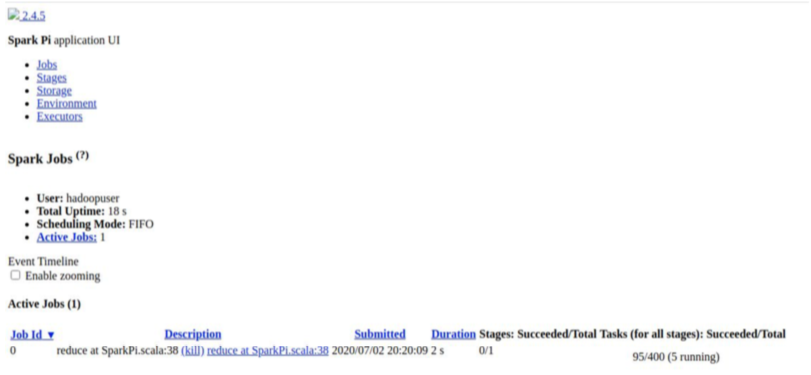
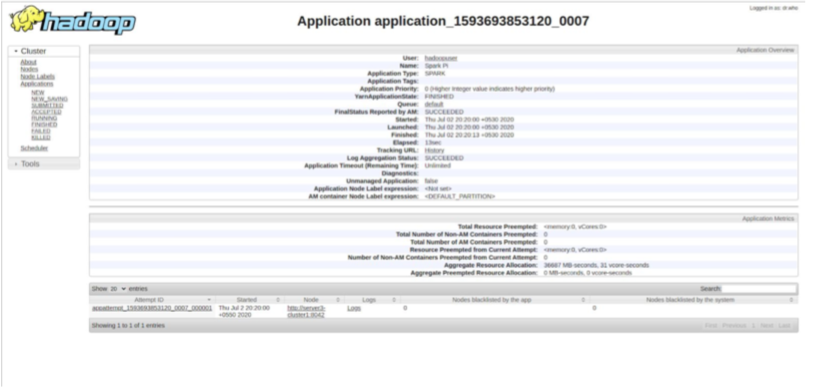
During the job execution you can check the status on spark web UI
http://server1.bigdata.com:4040/jobs/

​

​

We are a SaaS Application Development Company that provides end-to-end web and mobile app development services with a focus on next-gen technologies. Our development team is skilled at using the latest tools, frameworks, and SDKs to build performance-driven web and mobile applications that are easy to scale and customize. We have successfully completed several full-fledged SaaS projects for clients from across the globe. Our 360-degree SaaS application development services include quality assurance and software testing services.  

#SaaSApplicationDevelopment  #mobileappdevelopment 
​