Showing posts with label CloudDevelopment. Show all posts

Thursday, July 9, 2020

Create P2P connections with WiFi Direct in android

What is Android Wi-Fi P2p APIs?
It allows nearby devices to connect and communicate among themselves without needing to connect to a network or hotspot.

Advantages over traditional Wi-Fi ad-hoc networking?
  • Wifi-Direct supports WPA2(Wifi Protected Access) encryption.
  • Android doesn't support Wi-Fi ad-hoc mode.

Let's implement : 

Set up application permissions :
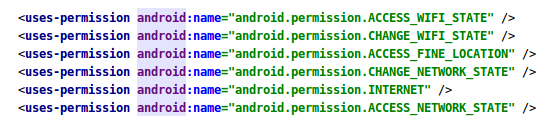
Set up a broadcast receiver :
With the help of broadcast receiver we will be able to listen various phases of connections between 2 devices.
Constructor of broadcast receiver class : 

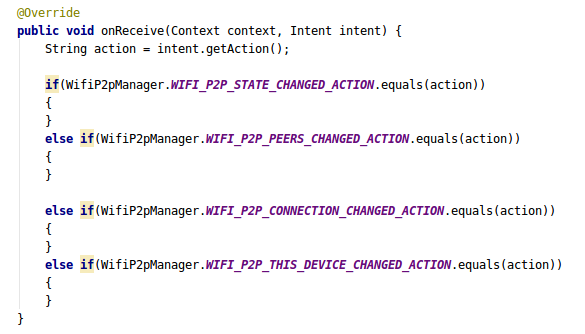
The onReceive() method of broadcast will look like this : 
Create an activity and register broadcast receiver : 
1- Create intent Filter : 
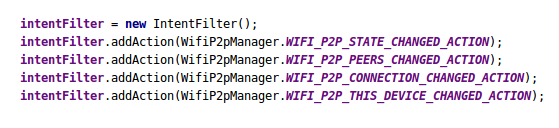
 
WifiP2pManager.WIFI_P2P_STATE_CHANGED_ACTION : Indicates a change in the Wi-Fi P2P status.
WifiP2pManager.WIFI_P2P_PEERS_CHANGED_ACTION : Indicates a change in the list of available peers.
WifiP2pManager.WIFI_P2P_CONNECTION_CHANGED_ACTION : Indicates the state of Wi-Fi P2P connectivity has changed.
WifiP2pManager.WIFI_P2P_THIS_DEVICE_CHANGED_ACTION : Indicates this device's details have changed.


2- Register receiver in OnCreate : 

Listen to broadcast receiver :

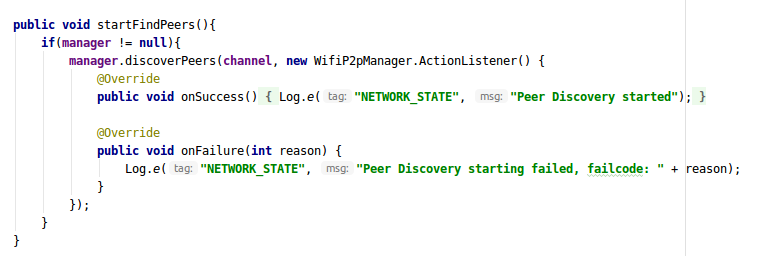
1- Now when you run the application you will find that your control will get to the WIFI_P2P_STATE_CHANGED_ACTION, so this the point where you will start finding the peers(nearby you) if your WIFI state is enabled.
So in your broadcast receiver check the wifi-state and start listen for peers if it is enabled.


And your startFindPeers method will look like this on Activity : 

2- As soon as you successfully discover the nearby peers the WIFI_P2P_PEERS_CHANGED_ACTION in your broadcast receiver class gets trigerred, so this is the point to get the list of all the available devices.
So, inside your broadcast onReceive method and add the following code in WIFI_P2P_PEERS_CHANGED_ACTION and register your peer callback : 
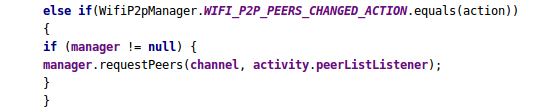

This requestPeer() method is implicitly provided by WifiP2pManager class but this peerListListener is custom and is used to as a callback for peerList : 
PeerListener will be like this : 

3- Now if the call is successful then you will get the list of all available devices with various other parameters in onPeersAvailable, iterate through the list and select one device to connect.
Now next step is to get the peer configurations of the selected item in the peerList and connect with peers using deviceAddress : 
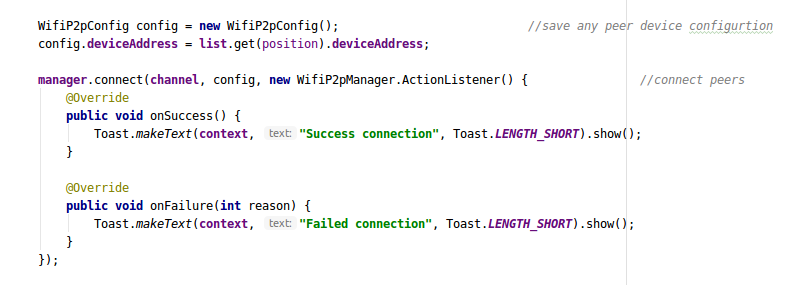
   

4- Once we get the successfull connection with the peer the WIFI_P2P_CONNECTION_CHANGED_ACTION is trigerred and this is the point to get the connection info from the connectionListener callback.
 The connection info can be get by passing connection callback as a parameter in requestConnectionInfo() method.
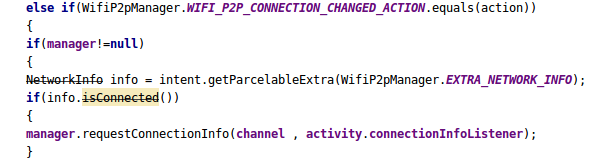
And the connectionInfoListener will look like this :
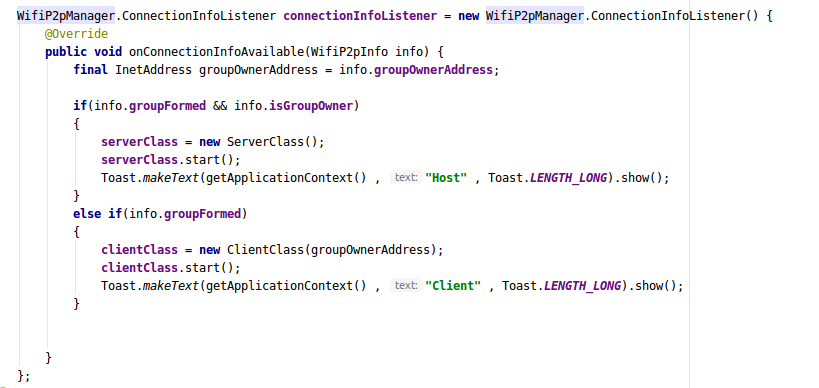

Great our peers are now connected to each other and can transfer data between themselves.

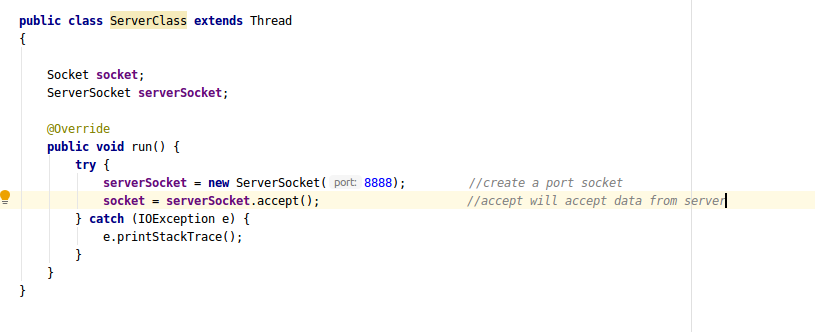
5- To transfer the data you have to create a client and server class based on available connection info.
Let's take a look at server class  : 
This is the client class : 
So finally, the sockets are now connected to each other and data transfer can be done easily using input and output streams of the socket.

We are a seasoned SaaS app development company that provides full-scale software solutions using next-gen technologies. Our team of developers is experienced in using the latest tools and SDKs to build performance-driven and user-friendly software solutions for multiple platforms. We also specialize in providing end-to-end DevOps solutions and cloud app development services for varied business requirements. For technical assistance, contact us at info@oodlestechnologies.com and share your requirements.

Thursday, June 25, 2020

An Introduction To Kafka Architecture and Kafka as a Service

Kafka and Kafka as a Service

Apache Kafka is a fast and scalable Publish/Subscribe messaging platform. It enables the communication between producers and consumers using messaging-based topics. It allows producers to write records into Kafka that can be read by one or more consumers per consumer group. It's becoming a solution for big data and microservices applications. It is being used by several companies to solve the problem of real-time processing. AWS development services also render support for Apache Kafka via its fully managed Amazon MSK (Amazon Managed Streaming for Kafka) platform.

A Broker is like a Kafka server that runs in a Kafka Cluster. Kafka Brokers form a cluster. The Kafka Cluster consists of many Kafka Brokers on several servers. Brokers often refer to more of a logical system or as Kafka as a whole.

It uses ZooKeeper to manage the cluster. ZooKeeper is used to coordinate the brokers/cluster topology. ZooKeeper gets used for leadership elections for Broker Topic Partition Leaders.

The Kafka architecture consists of four main APIs on which Kafka runs.
  1. Producer API:
This API allows an application to publish a stream of records to one or more Kafka topics.

Consumer API

It allows an application to subscribe to one or more topics. It also allows the application to process the stream of records that are published to the topic(s).

Streams API

This streams API allows an application to act as a stream processor. The application consumes an input stream from one or more topics and produces an output stream to one or more output topics thereby transforming input streams to output streams.

Connector API

This connector API builds reusable producers and consumers that connect Kafka topics to applications and data systems.

Kafka Cluster Architecture


Kafka architecture can also be described as a cluster with different components. 

Kafka Broker

A Kafka cluster often consists of many brokers. One Kafka broker can be used to handle thousands of reads and writes per second. However, since brokers are stateless they use Zookeeper to maintain the cluster state.

Kafka ZooKeeper

This uses ZooKeeper to manage and coordinate Kafka brokers in the cluster. The ZooKeeper notifies the producers and consumers when a new broker enters the Kafka cluster or if a broker fails in the cluster. On being informed about the failure of a broker, the producer and consumer decide how to act and start coordinating with other active brokers. 

Kafka Producers

This component in the Kafka cluster architecture pushes the data to brokers. It sends messages to the broker at a speed that the broker can handle. Therefore, it doesn’t wait for acknowledgments from the broker. It can also search for and send messages to new brokers exactly when they start.

Kafka Consumers

Since brokers are stateless, Kafka consumers maintain the number of messages that have been consumed already and this can be achieved using the partition offset. The consumer remembers each message offset which is an assurance that it has consumed all the messages before it. 


Kafka cluster setup via Docker

version: '2'

services:

  zookeeper:

    image: wurstmeister/zookeeper

    ports:

      - "2181:2181"

  kafka-1:

    image: wurstmeister/kafka

    ports:

      - "9095:9092"

    environment:

      KAFKA_ADVERTISED_HOST_NAME: kafka1

      KAFKA_ADVERTISED_PORT: 9095

      KAFKA_ZOOKEEPER_CONNECT: zookeeper:2181

      KAFKA_LOG_DIRS: /kafka/logs

      KAFKA_BROKER_ID: 500

      KAFKA_offsets_topic_replication_factor: 3

    volumes:

      - /var/run/docker.sock:/var/run/docker.sock

      - kafka_data/500:/kafka


  kafka-2:

    image: wurstmeister/kafka

    ports:

      - "9096:9092"

    environment:

      KAFKA_ADVERTISED_HOST_NAME: kafka2

      KAFKA_ADVERTISED_PORT: 9096

      KAFKA_ZOOKEEPER_CONNECT: zookeeper:2181

      KAFKA_LOG_DIRS: /kafka/logs

      KAFKA_BROKER_ID: 501

      KAFKA_offsets_topic_replication_factor: 3

    volumes:

      - /var/run/docker.sock:/var/run/docker.sock

      - kafka_data/501:/kafka


  kafka-3:

    image: wurstmeister/kafka

    ports:

      - "9097:9092"

    environment:

      KAFKA_ADVERTISED_HOST_NAME: kafka3

      KAFKA_ADVERTISED_PORT: 9097

      KAFKA_ZOOKEEPER_CONNECT: zookeeper:2181

      KAFKA_LOG_DIRS: /kafka/logs

      KAFKA_BROKER_ID: 502

      KAFKA_offsets_topic_replication_factor: 3

    volumes:

      - /var/run/docker.sock:/var/run/docker.sock

      - kafka_data/502:/kafka

Start The Cluster

Simply start the cluster using the docker-compose command from the current directory:
$ docker-compose up -d

We can quickly check which nodes are part of the cluster by running a command against zookeeper:
$ docker-compose exec zookeeper ./bin/zkCli.sh ls /brokers/ids

And that’s it. We’ve now configured a kafka cluster up and running. We can also test failover cases or other settings by simply bringing one kafka node down and seeing how the clients react.

Self-managed Kafka Services

We can also use Cloud-based self-managed kafka service on different cloud providers. cloud software development services provide fully managed and secure Apache Kafka service like Amazon MSK (Amazon Managed Streaming for Apache Kafka).

Tuesday, June 23, 2020

Benefits of Automation Through Microsoft Azure IoT Suite

The internet of things has grown in popularity as the number of connected devices has increased considerably over the past few years. According to Gartner, the global IoT market is expected to grow to 5.8 billion endpoints by the end of 2020. Having said that, the compound annual growth rate will be 21% as compared to the previous year. The advent of smart home automation technologies has unlocked new business opportunities for IoT application development Services


When it comes to IoT app development, a majority of businesses prefer cloud computing services to develop a centrally-managed IoT application. To address the increasing requirements of IoT app development, cloud platforms like AWS, Microsoft Azure and Google Cloud (GCP) have come forth with their unique serverless offerings. That being said, Microsoft Azure is rightfully considered a leading service provider for cloud-based application development. The Azure IoT Suite enables developers to build, deploy, and launch scalable IoT solutions for varied business requirements.

At Oodles Technologies, we have gained vast experience in cloud-based IoT app development services. Our development team is skilled at using cloud platforms like AWS, Azure, and GCP to develop scalable IoT apps with custom features. In this blog post, we enumerate the main benefits of Azure IoT Suite for building enterprise-grade applications with central tracking and analytics capabilities. 


An Introduction To Azure IoT Suite
Microsoft Azure is one of the fastest-growing cloud platforms for building IoT-based applications. According to Business Insider, it is the second largest cloud platform for IoT application development after AWS. Azure IoT Suite provides a comprehensive SaaS solution with a set of open-source SDKs to develop, scale, deploy, manage, and run user-centric IoT applications over a serverless cloud architecture.

Azure IoT Service At a Glance
Azure IoT Suite includes several independent cloud-based IoT services to address different types of project requirements. Let’s discuss these services and their significance in cloud-based IoT application development.

Azure IoT Central
Azure IoT Central is a cloud service that lets you connect the new and existing IoT devices to the Azure cloud. Furthermore, it enables developers to build a simple yet effective IoT app with real-time analytics capabilities. IoT central is extremely useful for decision makers who need a simple interface to track the connected devices and gain insights into data.

It provides several built-in templates based on the industry use cases to accelerate the development process and reduce time-to-market. Most importantly, it lets you integrate your IoT app seamlessly with the existing business infrastructure and third-party services. 

Azure IoT Hub
Azure IoT Hub lets you establish a reliable connection between Azure cloud and the IoT devices to facilitate a seamless communication. It is capable of handling billions of connected devices without affecting the cloud infrastructure. 

Developers can use Azure IoT Hub to securely channelize data between devices and establish a smooth two-way communication. It maintains a smooth flow of user commands from backend to the connected devices. At the same time, it ensures security and privacy of various communications through device registration, authentication, and message delivery authentication.

Azure IoT Edge
Azure IoT Edge enables enterprises to extend the capabilities of an IoT system with edge intelligence. The service lets you move some of your IoT data (including analytics and messages) to the edge computing devices. In this way, you can offload operations in the cloud, thereby reducing the bandwidth and overhead costs. It further accelerates the decision-making process and lets you operate offline as well. Above all, it facilitates provisioning and management of edge devices for better user convenience. 

You may also be interested in reading Building and Deploying ML Models On The Google Cloud

Benefits of Azure IoT Platform
Understandably, Azure IoT Suite offers some of the best services to develop, run, and manage IoT applications with better flexibility. Below are the main benefits of automation through Azure IoT Hub.

  • Simplified coding interface
  • Ready-to-use device templates
  • Real-time data analysis and visualization
  • Secure authorization and authentication
  • Flexible pricing model
  • Robust community support
  • Easy integration with third-party services

Conclusion
The future of IoT and smart home automation looks bright and promising. With the increasing applications of connected devices and industry use cases, it seems evident that IoT could be a mainstream technology in the near future. At the same time, cloud platforms like AWS, Azure, and GCP continue to evolve, bolstering their support for the internet of things. 

Why Choose Oodles Technologies For Cloud-based IoT App Development?
We are a seasoned cloud app development company that specializes in building scalable IoT and smart home applications using the latest tools and technologies. Our development team holistically analyzes your project requirements and formulates effective strategies to build a performance-driven IoT app that streamlines business processes. We have successfully completed full-fledged IoT projects for our clients with a focus on cloud-based automation.

Sunday, June 21, 2020

Google BigQuery And Its Benefits

Google BigQuery is an enterprise data warehouse built using BigTable and Google Cloud Platform. It’s serverless, completely managed and a part of Google cloud development services. It works great with most sizes of data, from a 100 row Excel spreadsheet to several Petabytes of data. Most importantly, this can execute a complex query on those data within a few seconds.

An Introduction To BigQuery

  1. Querying massive datasets 
  2. Secure Access Control 
  3. Single view of your data points
  4. Super-fast SQL-like queries 
  5. Google Analytics data in BigQuery 

Benefits of BigQuery

  1. Scales in Petabytes 
  2. Input/Output of TBs in seconds 
  3. 100,000 rows/sec per table Streaming API 
  4. Simple data ingest from GCS or Hadoop 
  5. Connect to R, Pandas, Hadoop, Dataflow, etc. 
  6. Row-level security and data expiration 

The Architecture of BigQuery

  1. It is based on Dremel, a technology pioneered by Google & extensively used within the organisation. 
  2. Dremel is a querying service which allows you to execute SQL queries against huge datasets (think hundreds of millions of rows)
  3. It uses multi-level execution trees to achieve interactive performance for queries against petabyte datasets.
  4. It’s performance advantage comes from its parallel processing architecture. 
  5. The query is executed by thousands of servers in a multi-level execution tree structure, with the final results aggregated at the root server.
  6. Data structured in BigQuery are in below format:
    1. Datasets 
    2. Tables 
    3. Rows 
    4. Columns 
  7.  It is a publicly available implementation of Dremel which is available as an IaaS.

Ways To Interact With BigQuery

  1. Loading and exporting data
  2. Querying and viewing data
  3. Managing data

To perform these interactions, you can use:

  1. The BigQuery web UI in the Cloud Console
  2. The BigQuery classic web UI
  3. The BigQuery command-line tool
  4. The BigQuery REST API or client libraries

Loading and exporting data in BIgQuery

In some cases, you load data into BigQuery storage. When you want to get the data back out of BigQuery, you can export the data.
Otherwise, you can set up a table as an external data source, which allows you to query data stored outside of BigQuery.

Querying And Viewing Data

After you load your data into BigQuery, you can use a query or view the data in your tables directly. For example, you can perform the following tasks:
  1. Run interactive queries
  2. Run batch queries
  3. Create a view, which is a virtual table defined by a SQL query
  4. Use partitioned tables to query a subset of your data

Managing data

You can handle data in BigQuery in the following ways besides querying and displaying the data:
  1. Listing projects, jobs, datasets, and tables
  2. Getting information about jobs, datasets, and tables
  3. Defining, updating, or patching datasets and tables
  4. Deleting datasets and tables
  5. Managing table partitions

Sample and Use cases of Big-Query

  1. To get unsampled custom funnels with added benefits 
    1. No Backfilling 
    2. Historical Information 
    3. Apply filters 
    4. Unlimited steps 
  2. To get the last interaction (event) that the user performed before landing on a given page 
  3. To get all the sessions with transactions wherein particular events were performed by users and funnels generated after when a particular event has been performed.

We are a cloud app development company that specializes in using Google Cloud Platform (GCP) to build scalable enterprise applications. Our development team is skilled at using Google BigQuery to address various Big Data challenges, augment data security, and facilitate seamless data accessibility.