Thursday, January 9, 2020

How to Merge a Flutter Project in Native Android Project

Flutter provides a comprehensive platform to develop feature-rich mobile application for Android and iOS platforms. By availing Flutter development services, organizations can build mobile applications from scratch or integrate Flutter modules in the existing native projects. After integration, we can develop the remaining part of the application in Flutter and this remaining part will automatically reflect in existing native projects.

Steps to Integrate Flutter project in native Android project
1 Open Android Studio
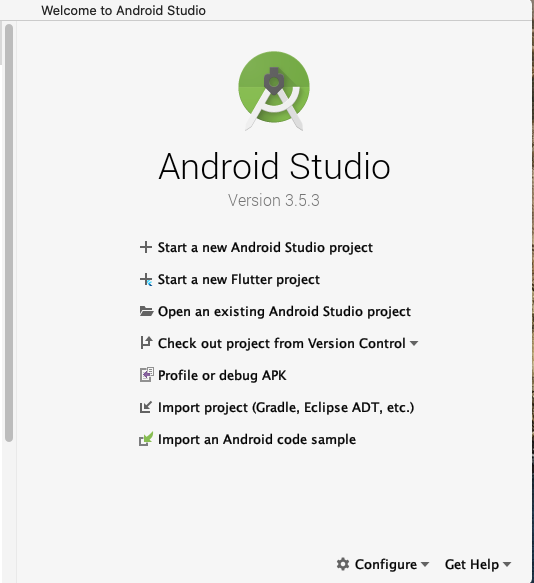

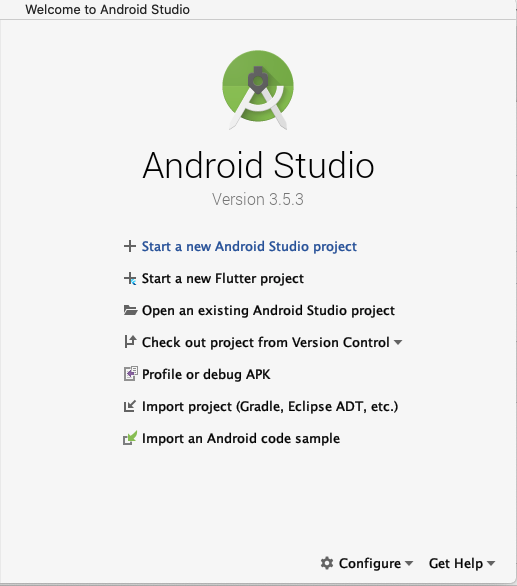
2 Select Start a new Android Project


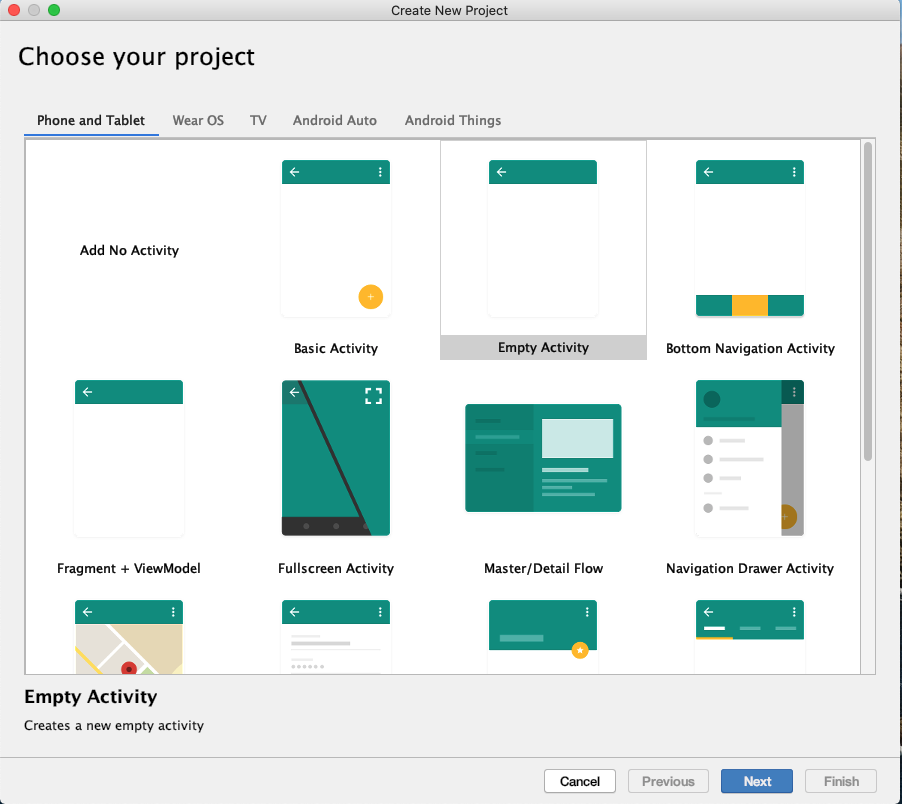
3 Select Empty Activity & Press Next


4 Set the Project name, location, language(Java/Kotlin) & minimum API level, then press Finish
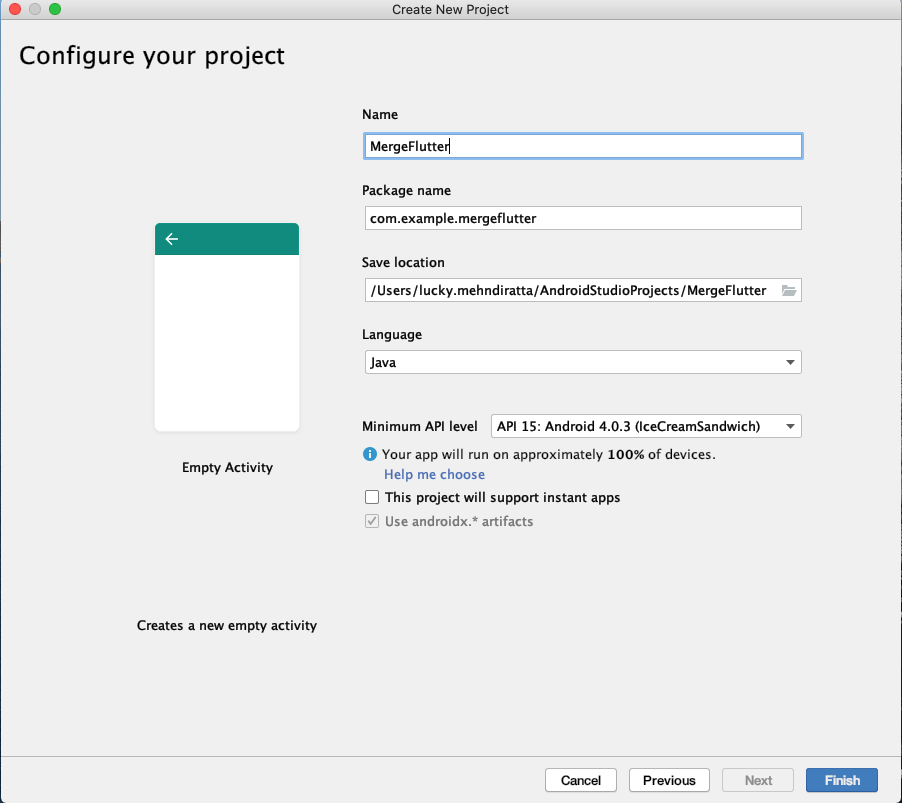


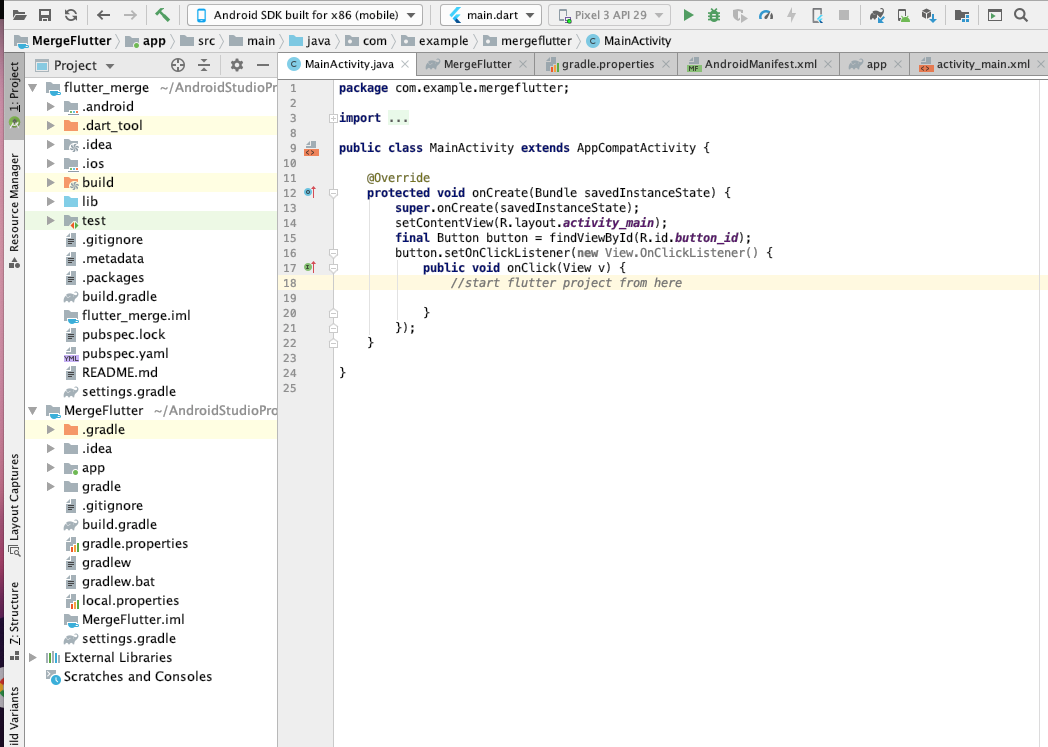
5 Now Screen look like the this
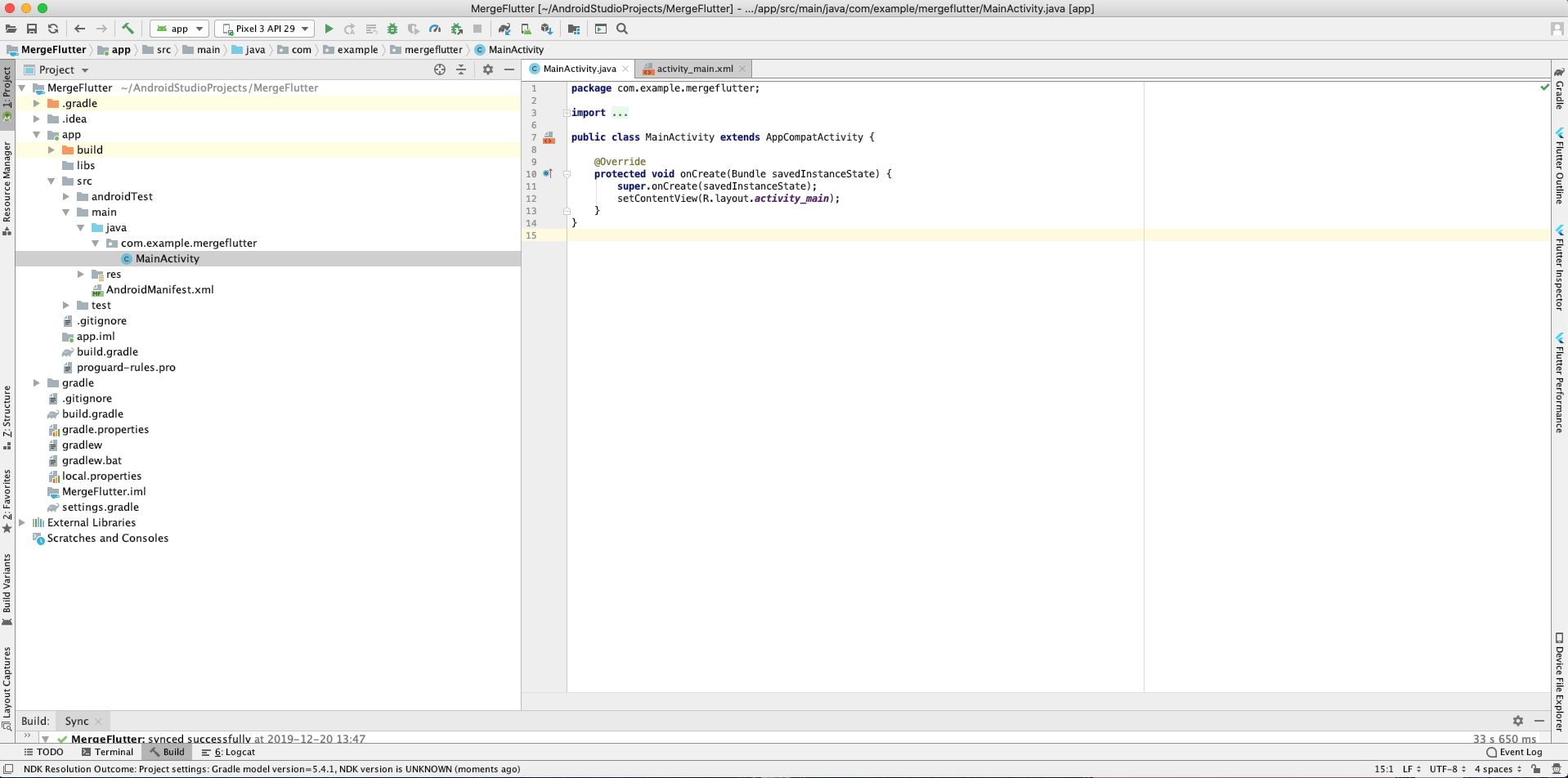
 

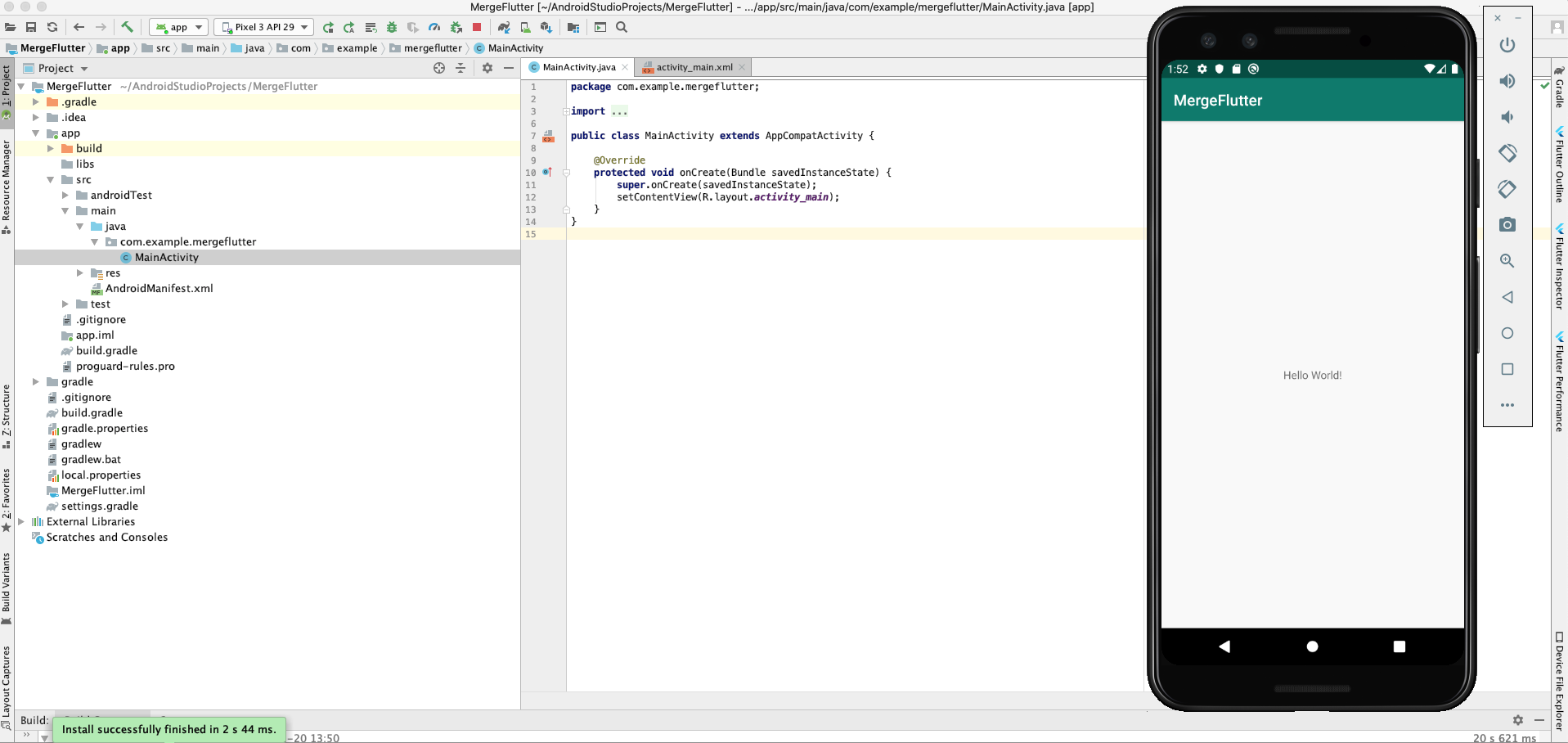
6 Run the Android Project by click on the run 


7 Now close android studio and start again Android Studio, this time select the New Flutter Project & Select Flutter Module 


8 Set Project Name, Flutter SDK path, Project Location
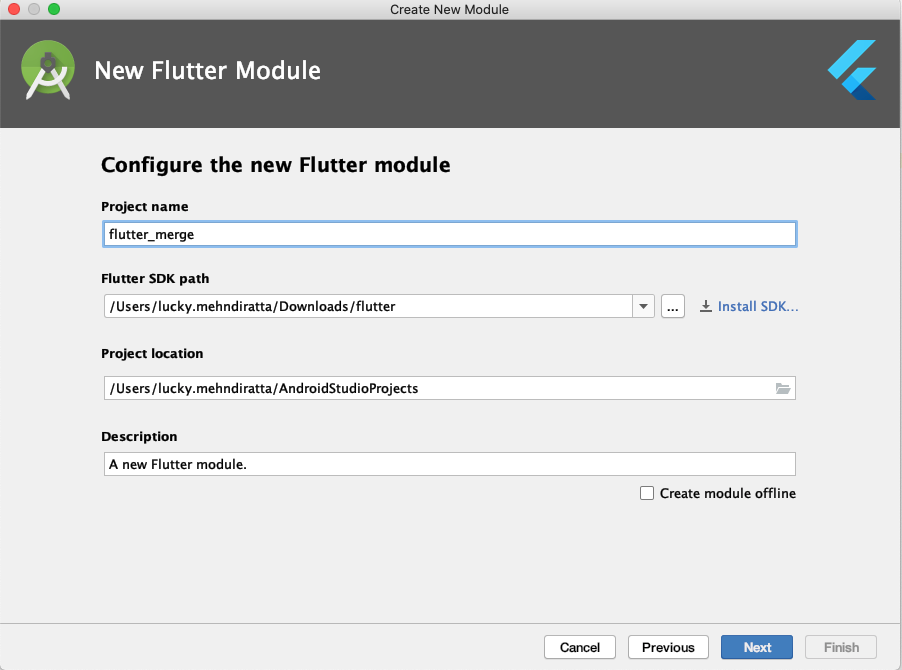
 

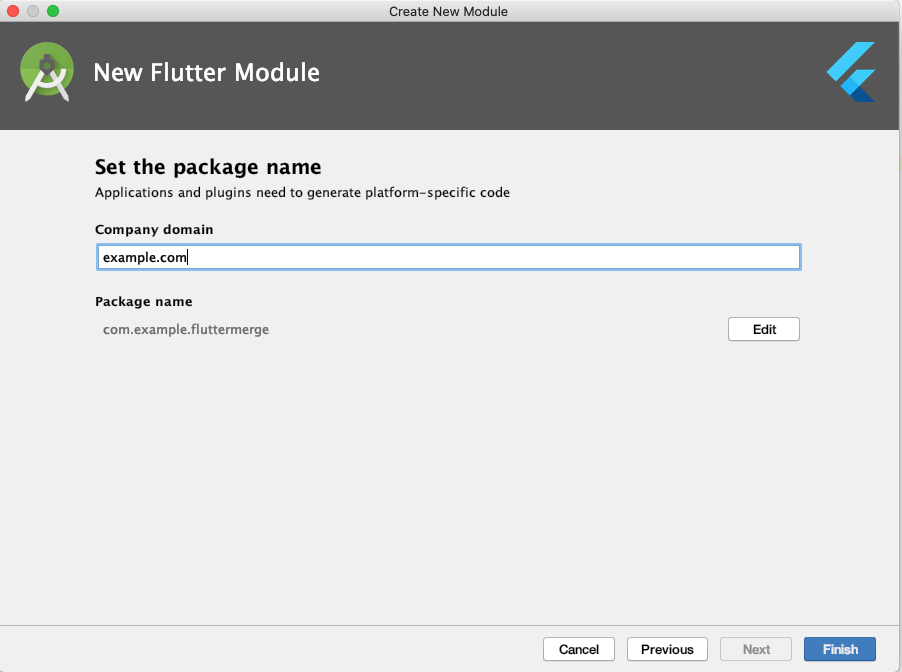
9 Press Next and Finish


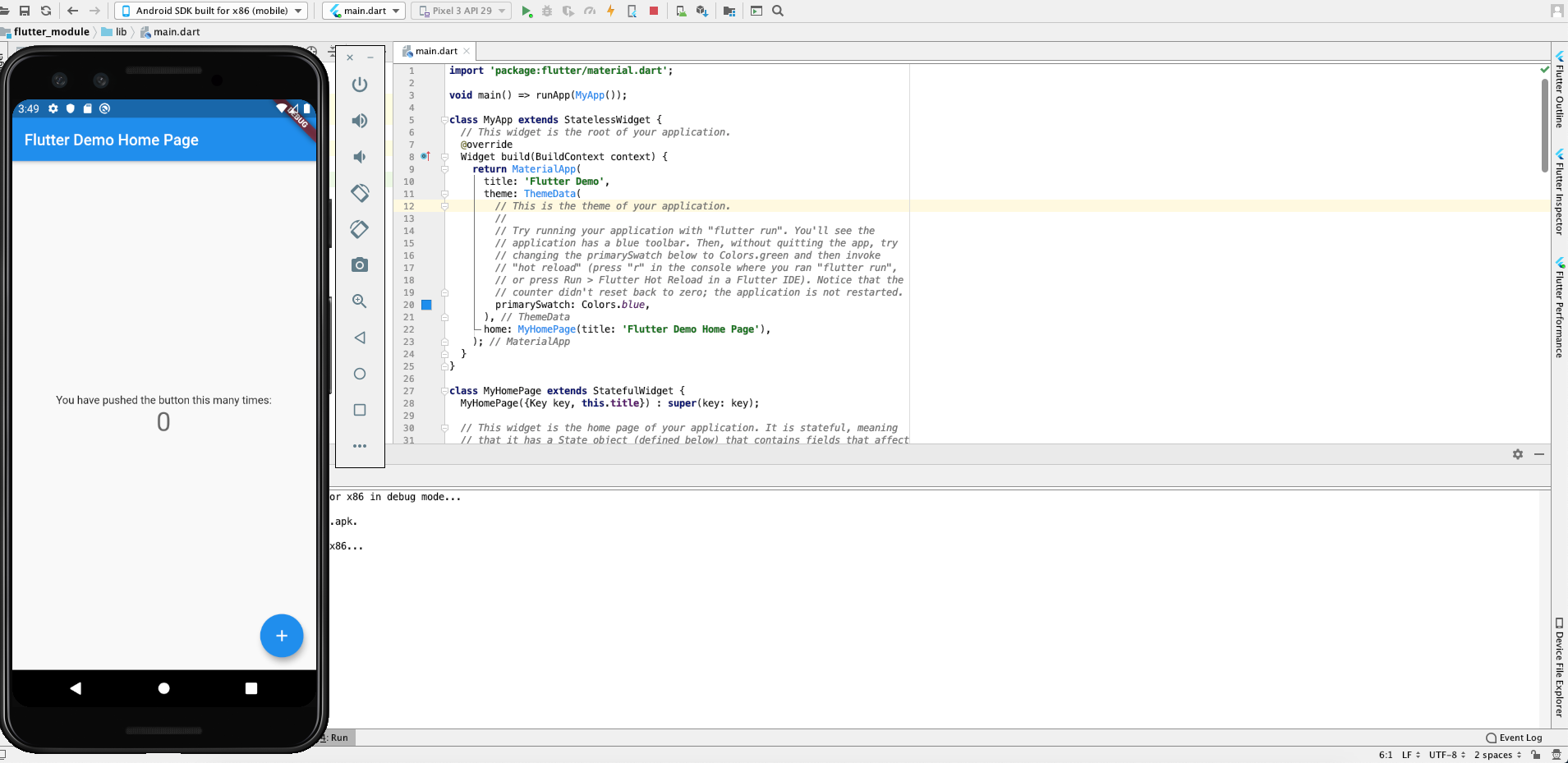
10 Run the Flutter Project 


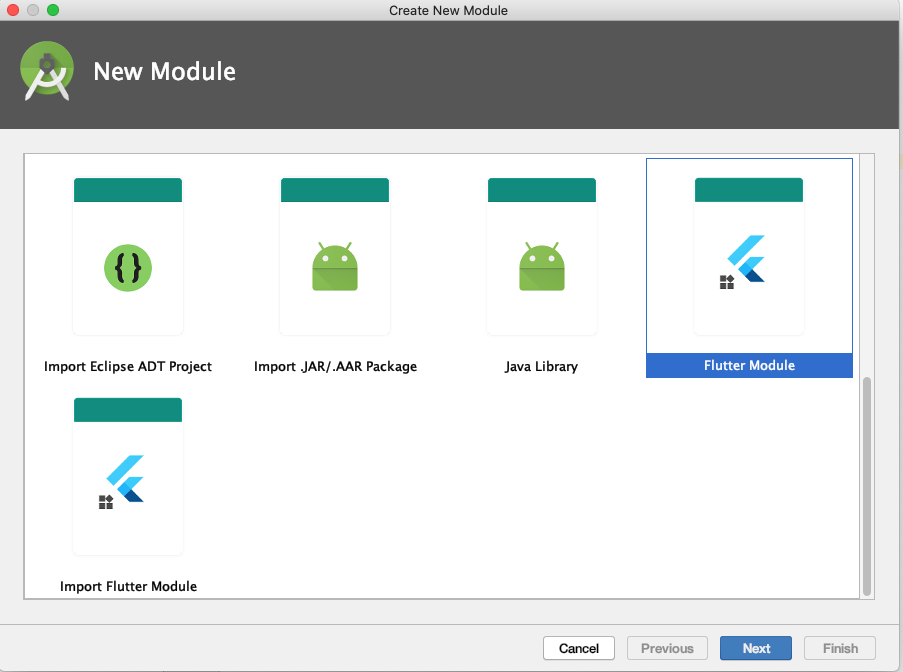
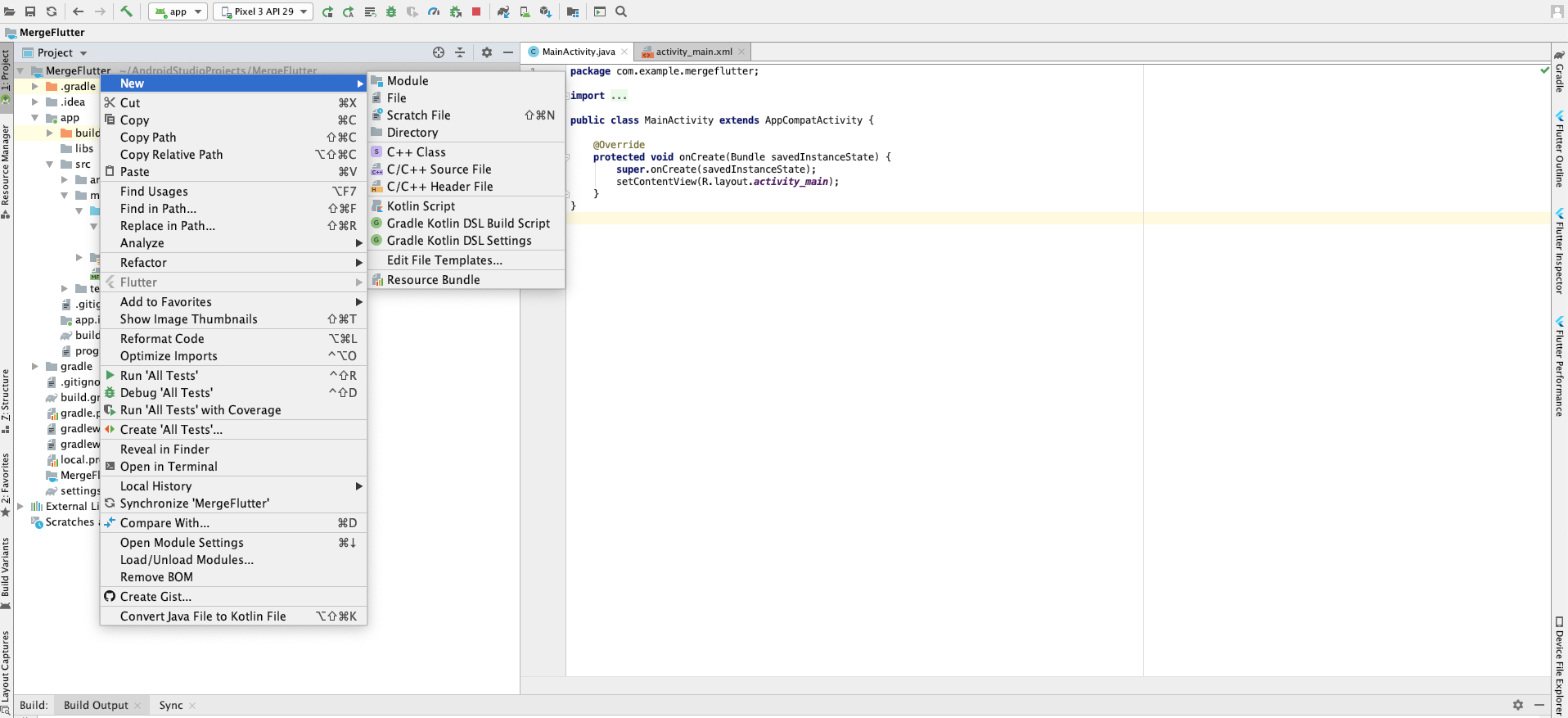
11 Now open native Android project(Step 1 to 6) and  right click on the project name -> New -> Module


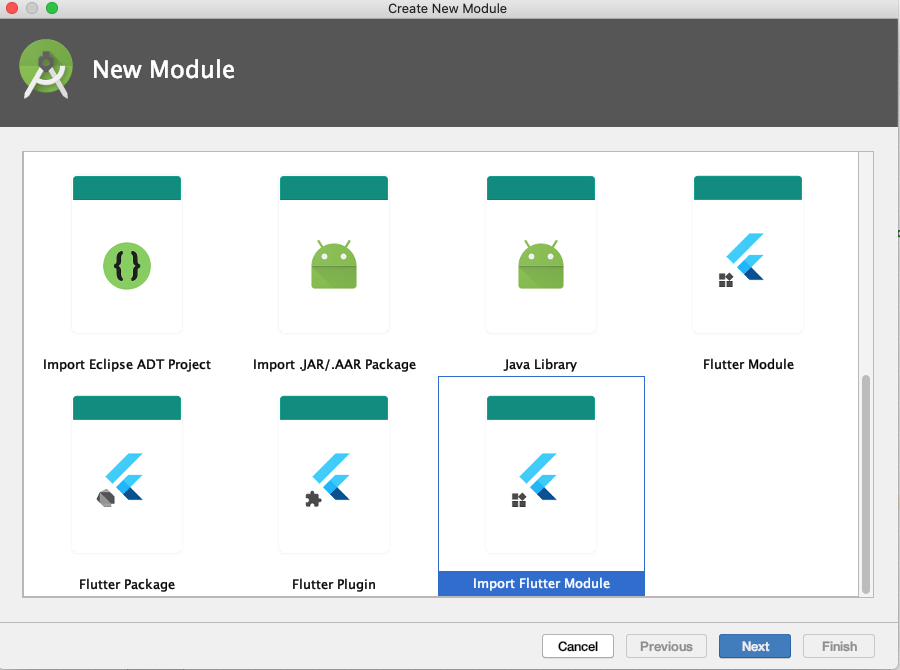
12 Select Import Flutter Module & presss Next


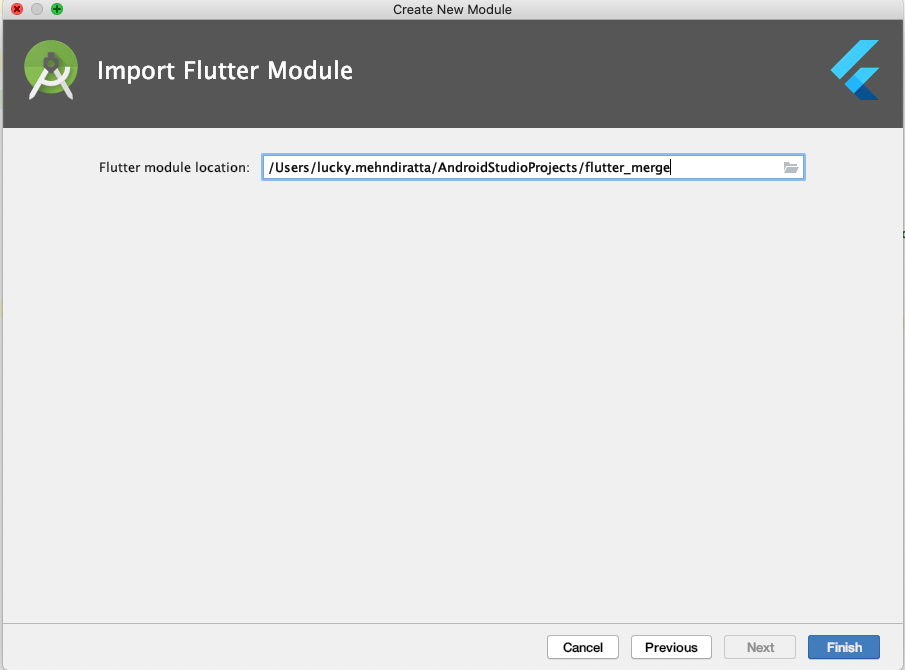
13 Select the Flutter Module path & Press Finish


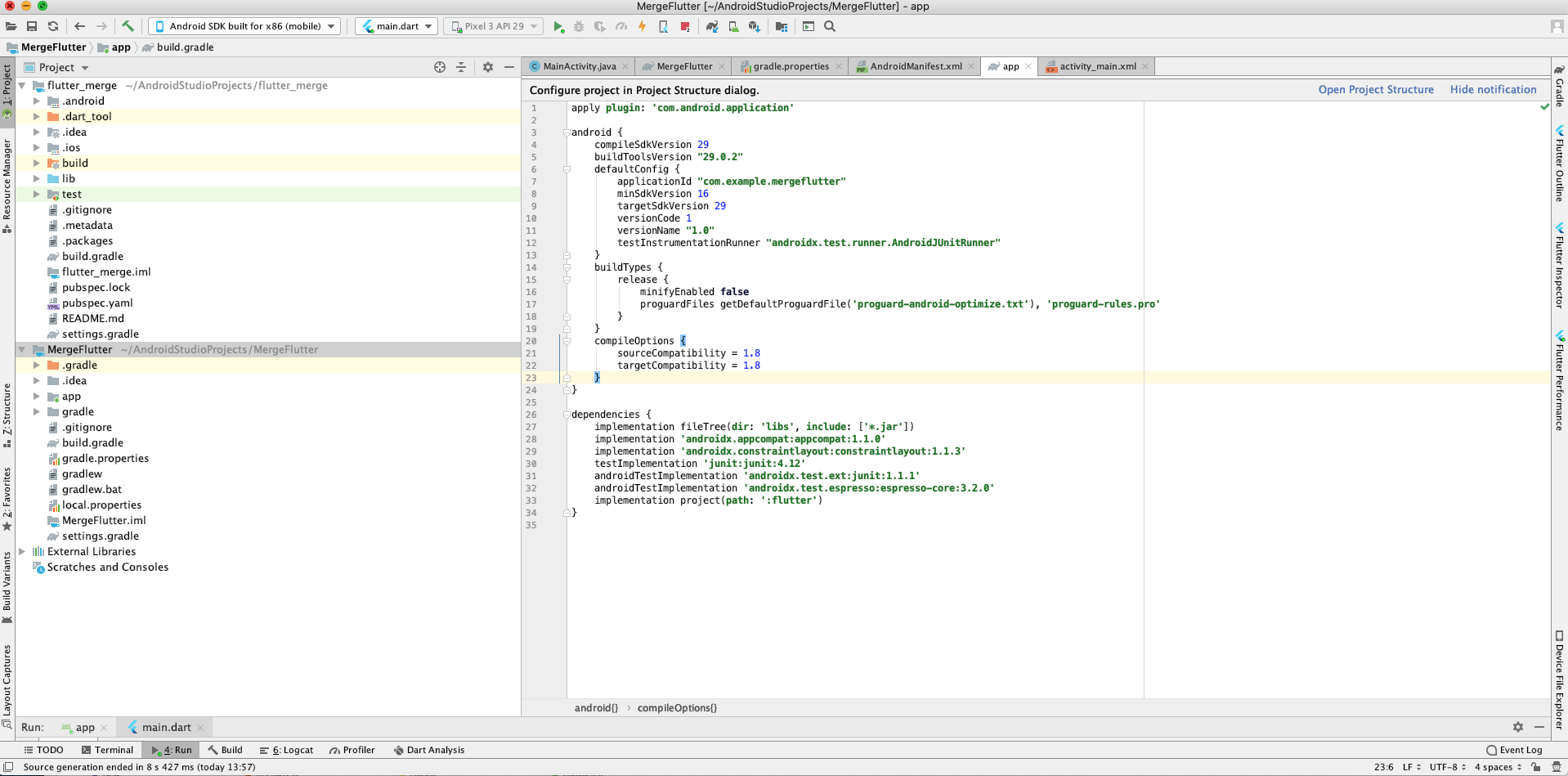
14 Now Project Structure look like this(Left Side)


15 Now Create a button in android activity_main.xml file and listener in MainActivity.java File 
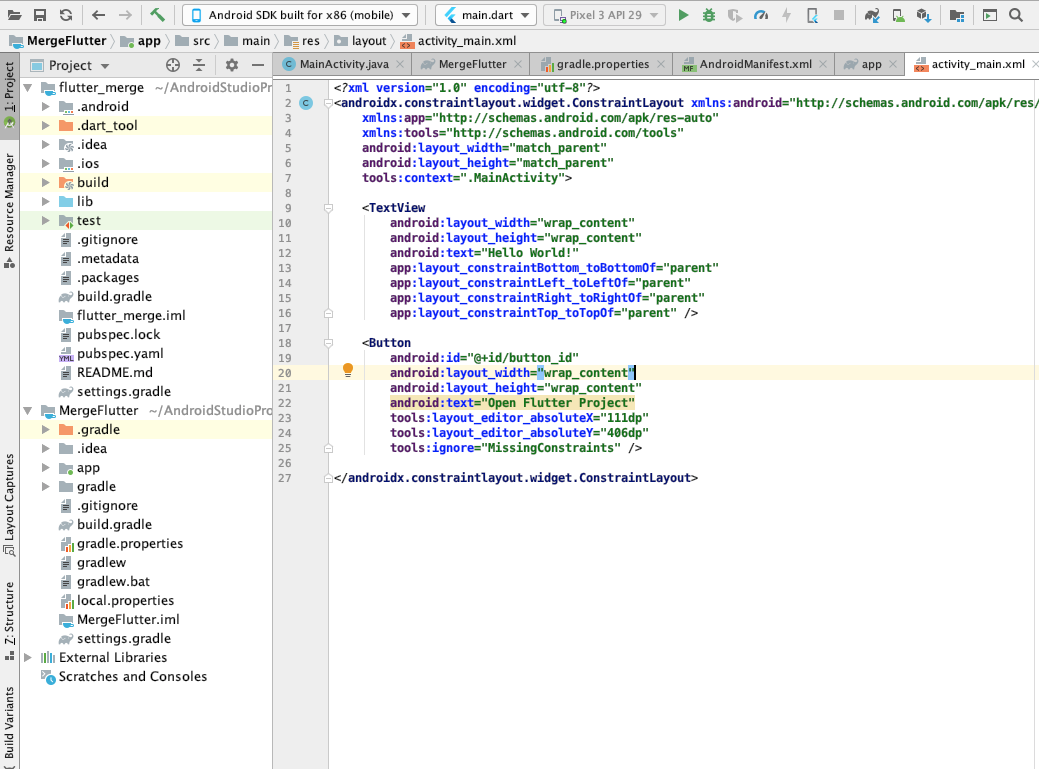


16 We use this Button to start our Flutter Module you can change this as per your requirement
17 Add the following line in AndroidManifest.xml File 
 <activity android:name="io.flutter.embedding.android.FlutterActivity" />

18 Add the following lines in Button Listener
 startActivity(
              FlutterActivity
              .withNewEngine()
              .initialRoute("/my_route")
              .build(MainActivity.this)
                );

19 Run the Android Project and click on Open Flutter Project Button.
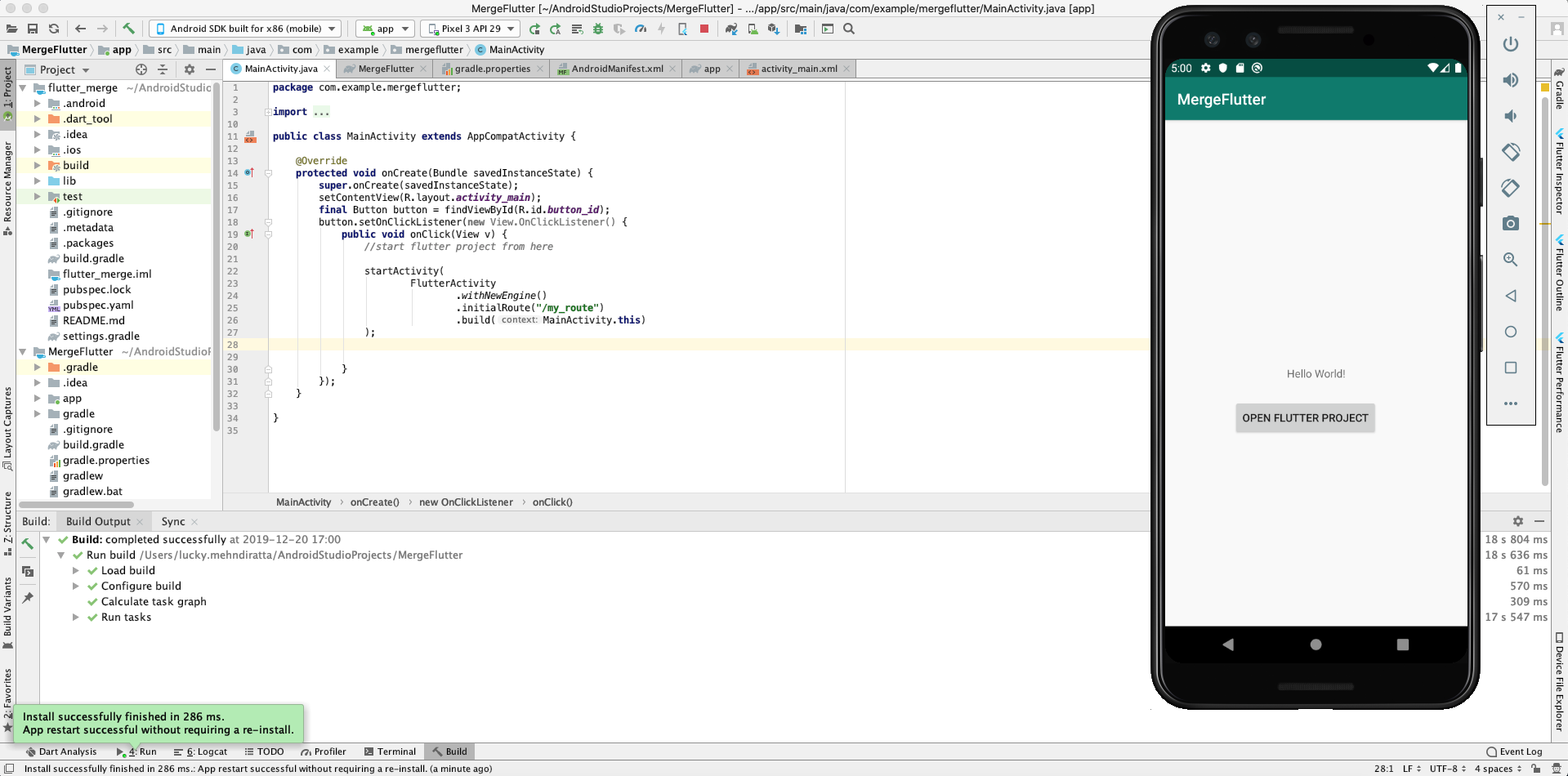

20 Now Flutter project successfully integrates in the native Android project.

Note: Please attach Flutter SDK to Android Studio if you want to do this. 

Explore our mobile app develpment services to accelerate your mobile app development project and reduce time-to-market.

Tuesday, November 26, 2019

Choosing a Suitable App Development Framework for your Business


The rapid rise of smartphone users enables businesses to focus on developing mobile apps for their customers alongside having a website. Today, mobile apps are used as a tool to improve sales and widen customer database. Ikea, a leading furniture retailer uses Virtual reality (VR) technology in its mobile app to influence customers purchasing capacity.  

A feature-rich app like Ikea can perform only with the right app development framework. The mobile app development frameworks fall under the following types: 

 
  • Cross-Platform development frameworks
  • Native Mobile development Frameworks


Cross-Platform Mobile App Development


The cross-platform app development framework is used for creating apps for more than a single platform. Most cross-platform app development frameworks support app development on Android and iOS platforms. Popular cross-platform mobile app development frameworks we use: 


Ionic: Ionic is a cross-platform app development framework built with Angular and Apache Cordova. The developers can use this single platform to develop apps for different operating systems. Mobile apps developed with Ionic runs on iOS and Android.


Additional Features:  

  • Ionic mobile apps are developed using regular web technologies like Angular, CSS, and HTML. It depends on Cordova that facilitates the usage of the device’s native features. 
  • No need to hire separate developers for Android and iOS. The single app fits with all the operating systems. 
  • Iconic App development framework saves time and cost

Flutter: Oodles technologies is a Flutter App development company. Our flutter app developers are well versed with Dart programming language to facilitate faster mobile app development. In this article Flutter app development for android and iOS, we have listed some benefits of choosing Flutter app development for your business app. 

Xamarine: An open-source framework acquired by Microsoft in the year 2016. The framework is based on c#. Xamarine app development framework does not depend on web technologies rather compiles down to native code for individual platforms. 

Additional Features :

  • Apps designed with Xamarine can achieve native app performance with little or no difference.
  • Creates rich experiences using native UI elements.
  • Facilitates sharing of 90% of the codebase across all platforms. 
  • Developers can design a uniform UI across all platforms using Xamarin.Forms.

AngularJS: AngularJS framework handles complexities developers face in website designing. Applying AngularJS in frontend app development enables developers to progress faster and impress clients. The framework is backed by Google which gives the developers an opportunity to enhance the performance of their apps and make their apps more responsive. Read more benefits of AngularJS app development here: AngularJS for Frontend Development. 

React Native App Development Framework: We are a React Native app development company that provides a single integrated solution for web application development. The framework is compatible with third-party plugins and supports the efficient development of additional features with zero downtime. In our article Understanding the Advantages of React Native Apps, you will explore why we use this framework for designing most of our client apps. 


Native Mobile Development Framework


There are very few Native app development frameworks. These frameworks are usually created by the company that owns the mobile platform. 

 
Apple created the iOS SDK(Software Development Kit) customarily used with Xcode- an IDE. The Android SDK is used with Android Studio as the IDE of choice. The frameworks contain SDKs along with programming languages used with them. Kotlin or Java for Android and Swift and Objective-C for iOS. Native apps perform faster and are compatible with device hardware and native features like accelerometer or camera. Native apps can be expensive because businesses will require separate app developers to develop an app for their business.  The after maintenance cost of native apps is also high. 

Are you planning to get a mobile app to promote your business online? Get in touch with our mobile app development experts today. We use mobile app development frameworks only after evaluating your business requirements. Get in touch with our experts to know which framework can support your business requirements! 

Wednesday, November 13, 2019

Choosing An Ideal DevOps Tool to Accelerate Development


The amalgamation of the development and operations (DevOps) team has enabled businesses to improve their software development life cycle(SDLC). Selecting the right DevOps tool maximizes the collaboration and communication between the development and operations teams. 

Here are some best DevOps tools we use to support automation and collaboration between development and operations team. 

  1. Gradel: Introduced in 2009, Gradel enables a software developer to write code in Java, Python, C++, and other languages. 

Popular Features: 
  • Popular IDEs like Eclipse, IntelliJ IDEA, and Netbeans support Gradel 
  • Google chose Gradel as an official build tool for Android Studio
  • Uses Groovy-based DSL to describe builds
  • Availability of Kotlin-based DSL enables mobile app developers to write build scripts in Kotlin
  • Uses Maven’s repository format, so dependency management is similar for developers with prior Maven experience
  • Supports import of Ant builds
  • Gradle’s incremental builds save compilation time
  • 100 times faster than Maven 
2. Git: The next on the popularity list is Git, used widely across the software development industry. 
Popular Features
  • Distributed SCM(Source Code Management) Tool suitable for open source contributors and remote teams
  • Enables tracking of mobile app development work
  • Facilitates switching from one source code to the other


To Integrate Git with DevOps workflow, businesses have to host repositories to enable the teams to accelerate software development. GitHub and Bitbucket are the two best GiT repositories available with easy integrations. 
  
GitHub- Access available for public repositories for free. Suitable to accomplish Git projects. 
Bitbucket- Available with free unlimited private repositories for small teams 


3. Jenkins- A leading DevOps automation tool designed to accelerate SDLC. 
Popular features
  • CI/CD server enables developers to automate different stages of the delivery pipeline. 
  • Availability of more than 1000 plugins support integration with different DevOps tools including Docker and Puppet
  • Easy to customize and set up CI/CD pipeline based on business-specific requirements
  • Easy to get started with and performs exceptionally great on Windows, Mac OS X, and Linux
  • Easy to install with Docker
  • Easy to set and configure through a web interface
  • Iterates and deploys new codes quickly
  • Facilitates measurement of each step of the development pipeline
4. Bamboo- The Choice of professional teams for continuous integration, deployment, and delivery and works similar to Jenkins.  
Popular Features:
  • An open-source tool facilitates developers to automate different stages of the delivery pipeline including builds and deployment 
  • Easy to use pre-built functionalities and 100+ plugins support integration with different DevOps tools 
  • Facilitates seamless integration with Jira and Bitbucket
  • Available with intuitive UI, tooltips, auto-completion, and other handy features.
  • Provides access to built-in Git and Mercurial branching workflows and test environments.
5. Docker- Launched in 2013, Docker has made containerization popular in the tech world. 
Popular Features
  • Operating System and Platform Independent
  • Automates deployment of apps and makes distributed development possible 
  • Isolates apps into separate containers, making them secure and portable
  • Docker containers can be used instead of virtual machines like VirtualBox.
  • Dependencies can be packed within the app’s container and shipped as an independent unit to run apps on different platforms 
  • Integrated seamlessly with Bamboo and Jenkins to improve delivery workflows
  • Ideal for cloud computing- Added by AWS and Google Cloud 
6. Kubernetes- Released in 2015 by Google Engineers, Kubernetes is an open-source container orchestration platform to automate deployment, scaling, and management of containerized applications.  
Popular Features
  • Facilitates grouping of containers into logical units
  • A logical step towards finding a solution to development complexities and scaling resources
  • Enables developers to automate the process of managing hundreds of containers.
  • Deployed to a cluster of computers to eliminate tying with containerized apps 
  • Automates the distribution and scheduling of containers across the whole cluster
  • Kubernetes cluster has a master and several worker nodes. The master node executes developers' pre-defined rules and deploys containers to the worker nodes. 
  • Evenly Redistributes the containers when the worker node is down. 
7. Puppet Enterprise- A cross-platform configuration management platform.
Popular Features 
  • Automates infrastructure management to accelerate the delivery of software 
  • Facilitates the management of infrastructure as code. 
  • Provides an additional open-source tool to accomplish small projects
  • Puppet Enterprise extra features like Real-time reports, Role-based access control, and Node management support large enterprises 
  • Manages multiple teams and thousands of resources
  • With more than 5000 modules, Puppet integrates flawlessly with other DevOps tools

8. Ansible- a Configuration management tool that works similar to Chef and Puppet. 
Popular Features 
  • Simple and easy to use
  • Configures infrastructure and automates deployment
  • Infrastructure as Code approach is same as Puppet
  • Uses the super simple YAML syntax to define tasks 
  • Agentless architecture since no daemons or agents run in the background
  • secure and lightweight solution for configuration management automation
  • several modules integrate flawlessly with other DevOps tools 

Choosing a right DevOps tool requires testing and experimentation. It usually takes more time to set up and configure open-source tools. Commercial DevOps tools come with free trials to enable developers test and evaluate the right one.

Planning to deploy a DevOps tool that supports automation and collaboration between teams? We are an established DevOps consulting service company. Click this link to talk to our experts today!

Monday, October 14, 2019

Cloud Based DevOps to Accelerate Software Development


Cloud-Based DevOps

Integration of DevOps with Cloud has opened opportunities for software development companies to shorten their software development life cycle (SDLC) with agility. The collaboration of Cloud and DevOps enables software developers to accelerate software development,  deliver fixes, features, and updates instantly. DevOps and Cloud enable mobile app developers to automate tasks including planning, analysis, design, development, testing, deployment, and production. 


We at Oodles, use Cloud-based DevOps solutions including AWS, Google Cloud, and Azure to accelerate software development and configuration, container management, integration, and deployment. 


Let’s explore the benefits of DevOps Cloud Services in the software development life cycle(SDLC): 

Centralized platform: The centralized nature of cloud computing provides a centralized and standard platform for DevOps automation. Cloud-based DevOps addresses the shortcomings of the water-fall method to meet the requirements of centralized software deployment. 

Amalgamation of Integration and Development: Public and private Cloud platforms support DevOps objectives of continuous delivery (CD) and continuous integration (CI) to reduce the cost associated with DevOps automation.  

Tools and Practices
Description
Version control
To track software versions
Build and deploy
Automate software development and deployment. 
Functional and non -functional testing
Automate testing
Provisioning and change management
Provide platform and track changes 

The shift of Focus : Cloud remote storage capabilities enables organizations to easily manage resources while shifting from the traditional waterfall model to the DevOps concept. 

Improved Scalability:  Cloud-based DevOps increases the scalability of application development. The cloud enables organizations to bypass physical hardware constraints to reduce infrastructure costs and increase global reach. 

Minimized Failure: Industry specialists like Amazon, Google, Facebook, Twitter, etc. rely on DevOps for continuous deployments throughout the day.  Cloud-based DevOps solutions enable organizations to make changes with minimum or no failure without affecting the current workflow. 


Speed to Delivery: The goal of IT organizations is to minimize their time to value. DevOps cloud services strengthen infrastructure and automate workflows to accelerate the delivery of software solutions. It identifies and eliminates risks during the initial stages of the development life-cycle. Cloud-based DevOps enable organizations to adapt to the changes that were previously unachievable.  

 
DevOps cloud computing reduces downtime through continuous cloud-based operations. Our cloud experts build stateless applications to reduce application downtime and maximum customer satisfaction. A combination of DevOps and cloud have removed the gap between development and operations teams. Implementing Cloud-based DevOps solutions enables development and operations teams to work in tandem to optimize developer's productivity and operations reliability.

 
Would you like to achieve flexibility in your software development life cycle? We customize your DevOps-ready private cloud environment to meet your business requirements, achieve efficiency and provide security.  DevOps software development methodologies deliver applications and services with efficiency. Our DevOps model automates and accelerates the processes between software developers and operations teams. The aim of our DevOps consulting services is to improve management processes, decrease cost and deliver end-to-end agility. 

Thursday, September 19, 2019

Benefits of Accounting With Odoo Twelve Accounting Software


Every business needs a secure accounting software that can enable them to monitor their progress, record assets and liabilities, maintain ledgers to evaluate the economic position of a company. With Odoo 12 Accounting businesses can record their transactions; process payments; create, send, and reconcile invoices; and audit statements. The software is connected to sales, Odoo Invoicing, manufacturing, inventory, subscriptions, POS, eCommerce, sales, expenses, and more for providing complete accuracy. 


Let’s explore some basic features of Odoo Accounting 


  1. Invoices and Payments


Odoo Accounting software enables businesses to manually create and send invoices through an invoicing app or a sales app. The software also facilitates accountants to split an invoice into multiple payments or payments into multiple invoices. With Odoo accounting module businesses can even process their payments through payment gateway connectors, credit cards, debit cards, wire transfers and more. It supports main payment gateways like Authorize.net, Ingenico, Paypal, Adyen, etc. 

2. Reconciliation


Odoo Accounting module makes it easier for businesses to reconcile their invoices with banks and other systems in real-time. Odoo synchronizes directly with your bank accounts to get bank statements imported automatically in Odoo in every 4 hours. 

3. Reports


Businesses constantly monitor their accounting reports to evaluate profit and loss, cash flow, tax audit statements, and more. Odoo allows businesses to easily create these reports using internal data. Businesses can also customize their dashboard data with shows charts and KPIs important to them. 


Let’s Explore Some Benefits of Accounting with Odoo 12 Accounting Software   


  1. Oddo creates an additional entry of every transaction like invoices, the point of sales (POS), customer invoices and more. The double-entry bookkeeping software is put into practice to stabilize journal entries. 
  2. Odoo 12 Accounting supports accrual and cash basis methods to report income or expense at the time of evaluating transactions. 
  3. Robust software efficiently supports and manages transactions of multiple companies. It facilitates users to receive instant access to their account details on-the-go using smartphones or tablets.