Sunday, July 12, 2020

New Features and Upgrades Coming To tvOS 14


In a recent Worldwide Developer Conference (WWDC), Apple revealed new features and minor upgrades coming to its much anticipated tvOS 14 update. Rolling out to all supported Apple TV 4K devices, the new update aims to bring a number of small incremental changes to enhance viewer experiences. Although tvOS 14 received a little mention in the WWDC, we are expecting more changes to be unveiled during the annual keynote this fall. 

Among the significant changes coming to tvOS 14 is the quick game resume, a feature similar to that on PS4 and Xbox One. It lets you resume a game on Apple TV where you left off. At the same time, it renders support for Xbox Elite series 2 and Xbox Adaptive Controllers. Let’s explore the upcoming features and other significant changes in tvOS 14.
 

New tvOS Features and Upgrades

As of now, Apple has only revealed limited information about its forthcoming tvOS 14 update. For all we know, this new Apple TV update mainly focuses on extending the existing functionalities rather than introducing new features. Based on the information shared by Apple during WWDC, below are the main features and upgrades coming to tvOS 14.  

Picture-in-Picture

Picture-in-Picture (PiP) was previously available in select iPad devices. With tvOS 14, Apple TV users will now gain access to this feature that allows them to move between apps while keeping the videos running. Having said that, the PiP feature was supported by select Apple TV 4K devices. However, it was previously limited to fewer applications and media types. Apple has extended their PiP feature with the latest update as it will now be supported by many other applications, in many other places. 

Multiple User Accounts

The previous version of tvOS (i.e tvOS 13) rendered multi-user support, providing different content recommendations for each user profile. However, the feature was limited to watching movies and TV shows. With the forthcoming release, Apple plans to extend this functionality for games as well via Apple Arcade.

Extended Gaming Support

As already mentioned above, tvOS 14 brings significant changes and upgrades for game lovers. Amongst the most sought after features is the quick game resume that enables users to resume a gaming app right where they left. In addition, it will now support Xbox Elite Series 2 and Xbox Adaptive Controllers that were released in late 2019. Besides, it will also provide game recommendations to users based on their previous gaming activities. 

Other Notable Changes

There are several other changes rolling out this major tvOS update. The list includes the following notable changes in tvOS:

  • Users can now use AirPlay feature to mirror 4K content from an iPhone to the Apple TV 4K devices
  • tvOS 14 enables audio sharing feature for all devices having H1 chip installed
  • Users can stream 4K videos from YouTube once Google releases the app update
  • HomeKit videos will now be accessible through Control Center
  • Users can select aerial screensavers based on various themes

You may also be interested in reading Apple TV Application Development

tvOS 14 Release Date

When Apple first announced its tvOS 14 update on June 22 during WWDC, it didn’t mention the official release date. For all we know, the update is rolling out this autumn along with the iOS 14 release and iPhone launch event. However, based on Apple’s previous Keynote events, we can expect tvOS 14 to arrive between 14th and 18th September 2020. 

Avail Our OTT Services To Build an Interactive Apple TV App

We are a seasoned IoT Development Company that excels in providing end-to-end OTT app development services for varied business requirements. Our development team is skilled at building interactive streaming apps for popular OTT platforms like Apple TV, Roku, Chromecast, and Amazon Fire TV. Our Apple TV app development services enhance viewing experiences of end-users by delivering high-quality content through secure channels for uninterrupted streaming.
#VideoStreaming AppDevelopment  #ARVRApp #DevelopmentCompany  #OTTApp #DevelopmentCompany  #IoTDevelopmentCompany #AppleTV #ApplicationDevelopment

New Features and Updates Coming To iOS 14


Apple recently announced its iOS 14 update coming this fall to the supported iPhone and iPad devices during its Worldwide Developers Conference (WWDC) in June 2020. Being a major iOS update, it is expected to bring significant changes, enhancements, and several new features to the iPhone/iPad users. 

Apple proclaims that iOS 14 is going to be their biggest update to this date. It brings home screen design changes, new modified features, updates for existing apps, Siri improvements, and many other major features to improve the iOS interface.

Let’s delve deeper into the new features, changes, and enhancements that are expected to roll out with this major iOS update.


Features

Home Screen Changes

iOS 14 introduces new design features for the Home Screen with better personalization. Users can customize it using the available widgets. In addition, there will be a new App Library and options to hide the entire pages of various apps, and much more.

Widgets

Earlier, widgets were available on the Today screen. But the iOS 14 update has brought a whole new look with completely redesigned widgets to give you more information at a glance. The widgets can be added to the home screen and adjusted as you like. You can choose from multiple sizes and stack widgets simply by dragging one over the other. In addition, iOS 14 brings smart widgets that automatically surfaces the widget option based on time, location, and activity.

App Library

iOS 14 has come up with this new feature called App Library which is positioned at the end of the Home Screen. The App Library automatically organizes all your apps into specific folders such as social, health and fitness, educational, and so on. There is also a folder for Apple Arcade that lets you explore the various features that you can unlock in games. Besides, the App Library provides different folders for recently added apps and suggestions, that show recommended apps based on time of day, location, and user activity. Furthermore, you can hide apps that you don’t want on your home screen. Instead, they will appear in the App Library. In a nutshell, iOS 14 brings in a more efficient way to organize your apps.

Compact Calls

With iOS 14, incoming calls from your iPhone, FaceTime, or third-party apps do not cover up the entire screen. Instead, they show up as a small banner at the top of your screen. You can swipe up to dismiss it or swipe down to answer it and see more call options. In case the phone is locked, you’ll see the standard phone call interface.

Picture in Picture

The Picture-in-Picture feature on the iPad is now extended to the iPhone with iOS 14. This feature enables you to keep watching a video or continue your FaceTime call while using another app in unison. The windowed view of the video or the FaceTime call will show up in the corner of the screen. It can be relocated and adjusted as per your convenience.

Messages

iOS 14 offers a number of new ways to stay connected to conversations that matter the most. It provides several new tools to customize your conversations with photos, emojis, and Memojis the way you like. You can pin your most important conversations to the top of your conversation list for easy access. This can be done for up to 9 conversations. With features like inline replies and mentions, you can direct a message to a specific person in a group chat.

In case of mentions, the name of the person you mention gets highlighted. You can also customize your group conversations to receive notifications only when you are mentioned. Besides, there are a bunch of new options for Memoji styles and stickers. You can choose from over 20 different hair and headwear styles that suit your personality, hobby, or profession.

Siri

With iOS 14, Siri has a new compact design with a host of new features. It is better equipped with translation functionality and an even more extensive base of knowledge. You can also record and send audio messages with Siri.
 

Maps

The Maps feature mostly looks the same. However, there are some useful features for those who have electric vehicles and those who like to bike. You can now get cycling directions using Maps. It shows you if there’s an elevation, stairs, or steep passages in your way. It also lets you see how busy the street is.

The electric vehicle routing feature shows all the charging stations along your planned route. Additionally, the Guides option in Maps shows a variety of places in a city to eat, shop, and explore.
 

Translate

Previously, translation capability was just a function of Siri in iOS 13. But now with iOS 14, Apple now has a completely new Translate app. It is designed for supporting conversations across 11 different languages.

Turning your iPhone to landscape mode will initiate conversation mode. It also has the ability to automatically detect the language you speak. The app has an offline translation mode that enables you to download languages and keep your translations private.
 

Home

The Home app has several new useful features that let you manage your smart home more effectively. With iOS 14, you have new automated suggestions and expanded controls in the control center. The app also provides services like Adaptive Lighting for compatible lights. It will automatically adjust your lights with the color temperature throughout the day. The face recognition feature can easily identify your friends and family with the information it already has.

Safari

With iOS 14, Safari is more responsive and enables new ways to protect your privacy. It can translate websites in 7 different languages. Besides, its password monitoring feature lets you detect saved passwords that may have been breached.


Car Keys and CarPlay

Using iOS 14, you can unlock and start your car with your iPhone. Your digital key is stored in the wallet app. You can easily share this key with friends or family through a messaging app. The Car Keys feature also lets you customize controls and restrict certain profiles as per your preferences. It works up to 5 hours even after your iPhone’s battery runs out.

CarPlay feature supports customizable wallpaper which lets you personalize your CarPlay dashboard and home screen looks. It also lets you download apps like parking, electric vehicle charging, and quick food ordering.
 

AirPods

With iOS 14, AirPods are now able to switch automatically between iPhone, iPad, Mac, and Apple Watch according to which device you are using. The new battery notification lets you know when your AirPods need charging.
 

App Clips

App Clips lets you access a small part of an app without having to download the full app. Using this facility you can rent a bike, pay for parking, order food, and do much more right at the time of need. It is fast, easily accessible, and transactions are safe with apps that use Apple Pay.
 

Privacy

With iOS 14, you get information on the privacy practices of every app in the App Store before downloading it. Also, all apps will need user permission before keeping a track of their activities. Whenever an app uses your microphone or camera, an indicator appears at the top of your screen. You can see if any app has used them recently in the Control Center. In addition, you can share only your approximate location instead of your exact location.

 
At Oodles, we have gained extensive experience in providing iOS application development company. We specialize in developing user-centric mobile applications with smart integration capabilities for intelligent features. Our development team is skilled at providing SaaS App Development Company ranging from architecture, development, optimization, maintenance, and much more.

Our Other Service

#VideoStreaming #AppDevelopment #IoTDevelopmentCompany #SaaSApp #DevelopmentCompany  #iOSapplication #Developmentcompany

Thursday, July 9, 2020

Create P2P connections with WiFi Direct in android

What is Android Wi-Fi P2p APIs?
It allows nearby devices to connect and communicate among themselves without needing to connect to a network or hotspot.

Advantages over traditional Wi-Fi ad-hoc networking?
  • Wifi-Direct supports WPA2(Wifi Protected Access) encryption.
  • Android doesn't support Wi-Fi ad-hoc mode.

Let's implement : 

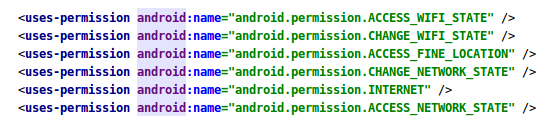
Set up application permissions :
Set up a broadcast receiver :
With the help of broadcast receiver we will be able to listen various phases of connections between 2 devices.
Constructor of broadcast receiver class : 
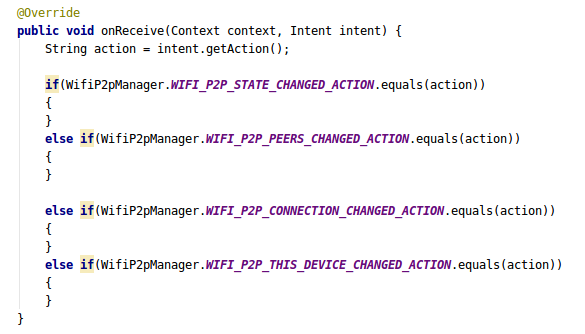
The onReceive() method of broadcast will look like this : 
Create an activity and register broadcast receiver : 
1- Create intent Filter : 
 
WifiP2pManager.WIFI_P2P_STATE_CHANGED_ACTION : Indicates a change in the Wi-Fi P2P status.
WifiP2pManager.WIFI_P2P_PEERS_CHANGED_ACTION : Indicates a change in the list of available peers.
WifiP2pManager.WIFI_P2P_CONNECTION_CHANGED_ACTION : Indicates the state of Wi-Fi P2P connectivity has changed.
WifiP2pManager.WIFI_P2P_THIS_DEVICE_CHANGED_ACTION : Indicates this device's details have changed.


2- Register receiver in OnCreate : 
Listen to broadcast receiver :

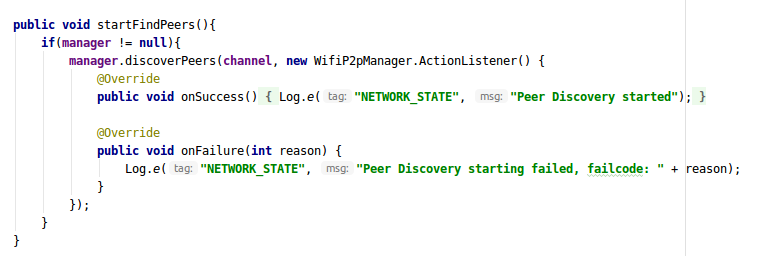
1- Now when you run the application you will find that your control will get to the WIFI_P2P_STATE_CHANGED_ACTION, so this the point where you will start finding the peers(nearby you) if your WIFI state is enabled.
So in your broadcast receiver check the wifi-state and start listen for peers if it is enabled.


And your startFindPeers method will look like this on Activity : 


2- As soon as you successfully discover the nearby peers the WIFI_P2P_PEERS_CHANGED_ACTION in your broadcast receiver class gets trigerred, so this is the point to get the list of all the available devices.
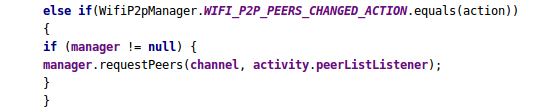
So, inside your broadcast onReceive method and add the following code in WIFI_P2P_PEERS_CHANGED_ACTION and register your peer callback : 


This requestPeer() method is implicitly provided by WifiP2pManager class but this peerListListener is custom and is used to as a callback for peerList : 
PeerListener will be like this : 

3- Now if the call is successful then you will get the list of all available devices with various other parameters in onPeersAvailable, iterate through the list and select one device to connect.
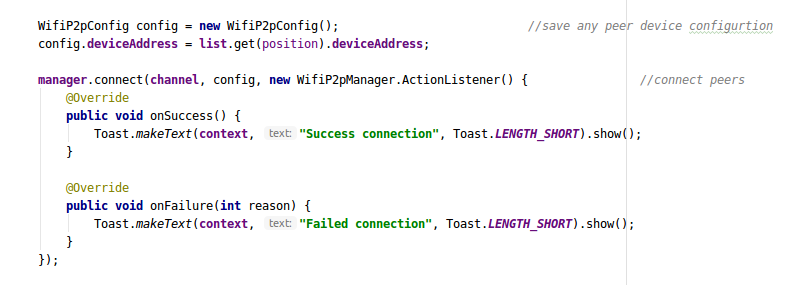
Now next step is to get the peer configurations of the selected item in the peerList and connect with peers using deviceAddress : 


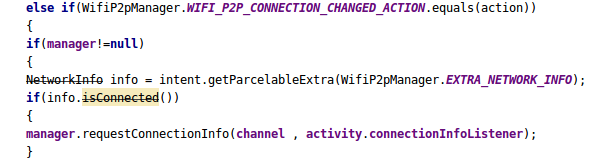
4- Once we get the successfull connection with the peer the WIFI_P2P_CONNECTION_CHANGED_ACTION is trigerred and this is the point to get the connection info from the connectionListener callback.
 The connection info can be get by passing connection callback as a parameter in requestConnectionInfo() method.

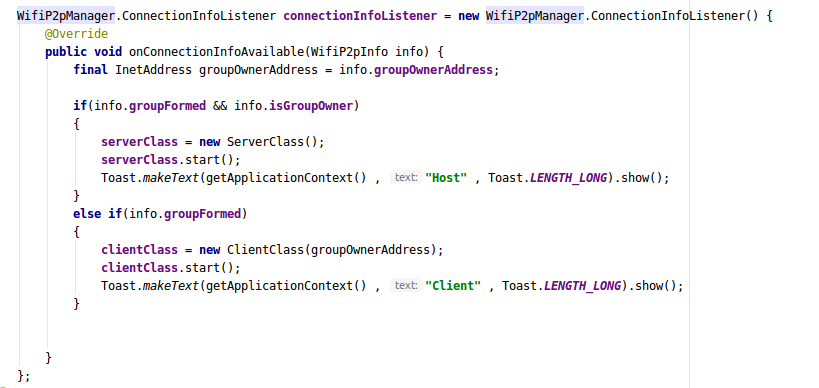
And the connectionInfoListener will look like this :


Great our peers are now connected to each other and can transfer data between themselves.

5- To transfer the data you have to create a client and server class based on available connection info.
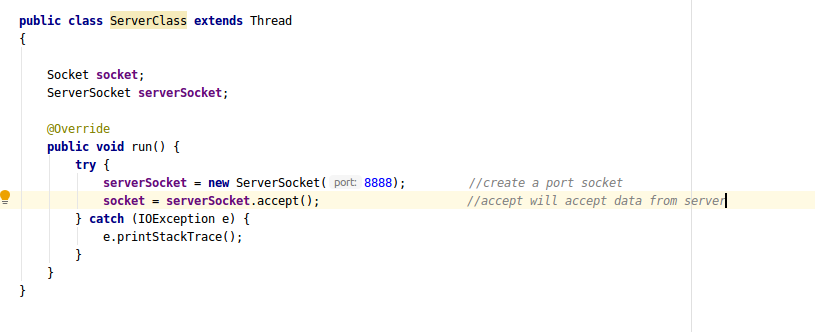
Let's take a look at server class  : 
This is the client class : 
So finally, the sockets are now connected to each other and data transfer can be done easily using input and output streams of the socket.

We are a seasoned SaaS app development company that provides full-scale software solutions using next-gen technologies. Our team of developers is experienced in using the latest tools and SDKs to build performance-driven and user-friendly software solutions for multiple platforms. We also specialize in providing end-to-end DevOps solutions and cloud app development services for varied business requirements. For technical assistance, contact us at info@oodlestechnologies.com and share your requirements.

Friday, July 3, 2020

Executor Framework in java

In this blog, we will tell you about the executor framework introduced in java since JDK 5 and how can we use it in our application development.

Executor framework introduced in version JDK 5 to perform concurrent execution in java and all the interfaces of this framework available in java.util.concurrent package.
Interfaces available in Executor framework given below:
i) Executor
ii) Executor Service
iii) Scheduled Executor Service


All these interfaces represent an asynchronous execution mechanism that is capable of executing multiple tasks concurrently in the background.

Executors is a factory class which is used to provide the instances of these interfaces such as for Executor Service class we need a pool of threads with size 10 so we can use Executors.new Fixed Thread Pool( size of thread pool ) method.

Creating an Executor Service:


ExecutorService executorService = Executors.newFixedThreadPool(10);


ExecutorService implementation class contains many methods but here we see an example of execute(Runnable) and submit(Callable) method, which contains runnable implementation class instance to execute in a concurrent way.


executorService.execute(new Runnable() {
 public void run(){
   System.out.println("Concurrent task");
          }
});


Callable is an interface just like Runnable but the difference is that Callable interface's abstract method call() can return Object type instance. While calling submit(Callable) method, it is returned Future object which contains the return value we can use get() of Future to get a return value.

Future future = executorService.submit(new Callable(){
    public Object call() throws Exception {
        System.out.println("Concurrent Callable");
        return "Callable Result";
    }
});

System.out.println("future.get() = " + future.get());


Now here we need to take one more action shutdown() method to shut down the executor service after all task completion but we have another method also to shutdown executor service such as shutdownNow() for immediate shutdown and await Termination() method will block the thread calling it until either the Executor Service has shut down completely and it is called after shutdown() and shutdown Now().

Conclusion: I hope you like this blog and I hope it is very useful for you in the future whenever you want to save your time to perform additional tasks in a concurrent way.
Thank you and Happy coding.


We are an OTT App Development Company that give start to finish OTT administrations to fabricate endeavor grade programming applications with adaptability of the OTT administrations. Our improvement group is gifted at utilizing AWS stage to manufacture, send, scale, and oversee cloud-based applications with custom highlights. We are likewise knowledgeable about flawlessly relocating your application information from its current tech stack to the OTT administrations. We have effectively finished a few full-scale cloud ventures for new companies, SMEs, and huge scope endeavors. 

Our Other Services